Loading
Get Itt46
How it works
-

Open form follow the instructions
-

Easily sign the form with your finger
-

Send filled & signed form or save
How to fill out the Itt46 online
This guide provides comprehensive instructions for effectively completing the Itt46 online. Designed for individuals looking to order services from Verizon under the Commonwealth of Massachusetts Statewide Contract, this guide will walk you through each section and field of the form.
Follow the steps to complete the Itt46 form efficiently.
- Press the ‘Get Form’ button to download the Itt46 form and open it for editing.
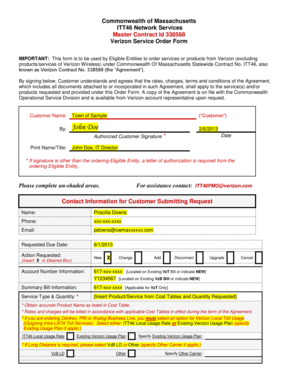
- Begin by entering the customer name in the specified field as 'Town of Sample', and provide the date of submission.
- Sign in the designated area as the authorized customer. If the signature differs from the ordering eligible entity, remember to include a letter of authorization.
- Provide your contact information, including the name, phone number, and email of the person submitting the request.
- Indicate the requested due date for the order and specify the action requested by selecting one of the options: New, Change, Add, Disconnect, or Upgrade.
- Fill in the account number information clearly. Make sure to include the correct identifier for existing services or indicate if the order is new.
- In the service type and quantity section, insert the exact product or service name from the provided cost tables and the quantity requested.
- Complete the billing and contact information sections accurately, ensuring that the billing contact name, phone number, and email are visible.
- Input the service or installation location details, including street address, city, state, and zip code. If there are multiple locations, add them accordingly with clear designation.
- Fill out the primary and secondary technical contacts with their names, phone numbers, and emails as required.
- Review and add any access arrangements or additional comments that might be necessary for service installation.
- Ensure all sections are completed correctly and save your changes. After reviewing for accuracy, download, print, or share the completed form as needed.
Start filling out your Itt46 form online today to order your services seamlessly.
ITT72 has replaced ITT46, Network Services and ITT50, Converged Voice and Data Communications Systems. Under ITT72, eligible entities of the state can procure the following types of hardware, software, and services from IntraSystems: Firewalls. Access Points. Switches.
Industry-leading security and compliance
US Legal Forms protects your data by complying with industry-specific security standards.
-
In businnes since 199725+ years providing professional legal documents.
-
Accredited businessGuarantees that a business meets BBB accreditation standards in the US and Canada.
-
Secured by BraintreeValidated Level 1 PCI DSS compliant payment gateway that accepts most major credit and debit card brands from across the globe.