Loading
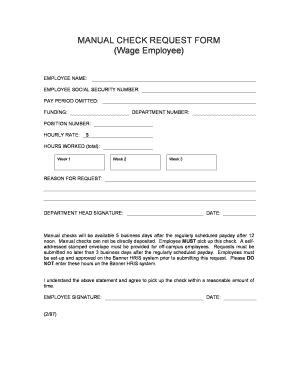
Get Manual Check Request Form - Controller's Office Virginia Tech - Controller Vt
How it works
-

Open form follow the instructions
-

Easily sign the form with your finger
-

Send filled & signed form or save
How to fill out the MANUAL CHECK REQUEST FORM - Controller's Office Virginia Tech - Controller Vt online
This guide provides a clear and supportive approach to completing the Manual Check Request form required by the Controller's Office at Virginia Tech. Follow the steps outlined below to ensure that your request is submitted correctly and efficiently.
Follow the steps to effectively complete your manual check request.
- Click ‘Get Form’ button to obtain the form and open it in the editor.
- Begin by entering your employee name in the designated field. This information is essential for identifying your request.
- In the next field, provide your employee social security number. This is required for verification purposes.
- Indicate the pay period that has been omitted by selecting or entering the relevant dates.
- Fill in the funding section with the appropriate account or funding source associated with your payment.
- Input your department number accurately to ensure the request is processed within your department.
- Enter your position number, which helps in correlating your identity within the organizational structure.
- Specify your hourly rate, ensuring it reflects the correct payment level agreed upon.
- List the total hours worked across the specified weeks: Week 1, Week 2, and Week 3, breaking them down as necessary.
- Provide a reason for the request in the designated area, clearly stating why a manual check is necessary.
- Obtain the department head's signature to authorize the request, ensuring all necessary approvals are in place.
- Finalize the form by entering the date of submission in the corresponding field.
- Read and confirm your understanding of the notes regarding manual check availability and pick-up policy. Sign the form to acknowledge agreement.
- After completing all fields accurately, you may save changes, download, or print the form for submission, or share it with relevant parties.
Complete your manual check request today by filling out the form online.
Check requests are user-initiated requests for invoice payment. These requests contain information that populates a manual invoice within Accounts Payable. Invoice Number, Invoice Date, Invoice Total, Vendor, and Pay To data can be entered on a check request, as well as check total and distribution detail amounts.