Loading
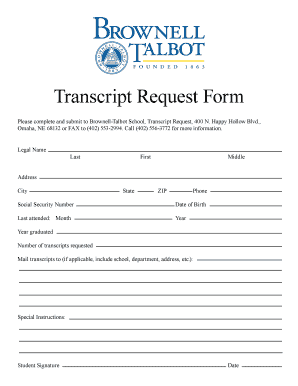
Get Transcript Request Form - Brownell-talbot School - Brownell
How it works
-

Open form follow the instructions
-

Easily sign the form with your finger
-

Send filled & signed form or save
How to fill out the Transcript Request Form - Brownell-Talbot School - Brownell online
Filling out the Transcript Request Form is a straightforward process that ensures you receive your educational transcripts from Brownell-Talbot School efficiently. This guide provides step-by-step instructions to help you navigate the form accurately.
Follow the steps to complete your transcript request form online.
- Press the ‘Get Form’ button to access the Transcript Request Form. This will allow you to open the document for completion.
- Begin by entering your legal name in the designated fields. Fill in your last name, first name, and middle name if applicable.
- Provide your current address, including city, state, and ZIP code. Ensure that your phone number is also included for contact purposes.
- Enter your Social Security number in the appropriate field. This information is necessary for identification and processing.
- Input your date of birth to verify your identity as part of the transcript request.
- Indicate the last month and year you attended Brownell-Talbot School, followed by the year you graduated.
- Specify the number of transcripts you are requesting. Be clear if additional copies are needed.
- If applicable, provide the mailing details for where the transcripts should be sent. Include the school name, department, address, and any other pertinent information.
- Fill in any special instructions that may assist the school in processing your request.
- Sign the form to authorize the request and include the date when the signature is provided.
- Once all fields are completed, save your changes, and you have the option to download, print, or share the form as necessary.
Complete your Transcript Request Form online today for a smooth and efficient process.
To obtain a transcript from a California public school, you will need to contact the school directly. If the school is closed, we suggest contacting the local school district or the County Office of Education for assistance. Contact information for these entities may be obtained from the California School Directory.