Loading
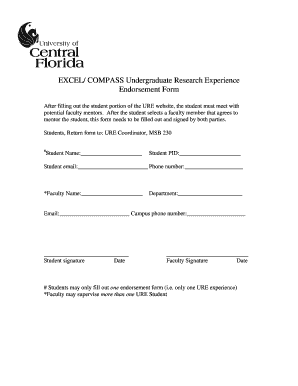
Get Download The Endorsement Form - Ure - Ure Excel Ucf
How it works
-

Open form follow the instructions
-

Easily sign the form with your finger
-

Send filled & signed form or save
How to use or fill out the Download The Endorsement Form - Ure - Ure Excel Ucf online
Filling out the Download The Endorsement Form - Ure - Ure Excel Ucf is an essential step for students seeking faculty mentorship in their undergraduate research experience. This guide offers a clear, step-by-step approach to completing the form accurately and efficiently, ensuring that both students and faculty can navigate the process smoothly.
Follow the steps to successfully complete the endorsement form.
- Click the ‘Get Form’ button to access the endorsement form online and open it in your preferred editor.
- Begin by entering the student's name in the designated field. Ensure that the name is spelled correctly as it will be used in official records.
- Next, fill in the student's PID (personal identification number). This number is essential for proper identification within the university system.
- Provide the student's email address. Ensure that it is a valid university email address for effective communication.
- Enter the student’s phone number in the appropriate field. This information may be used for follow-up communication regarding the endorsement.
- In the faculty section, input the mentor's name. Confirm that the faculty member has agreed to be the mentor before completing this section.
- Fill in the department name of the faculty mentor. Accurate information here helps in routing inquiries and correspondence correctly.
- Enter the faculty member's email address to ensure clear communication between the faculty, student, and the coordinator.
- Provide the campus phone number of the faculty mentor for verification and future contact.
- Both the student and faculty mentor need to sign and date the form in the designated fields. This step confirms that both parties agree to the mentorship relationship.
- Once all information is complete, review the form for any errors or missing information before submission.
- After verification, save your changes, and you can choose to download, print, or share the completed form as necessary. Finally, return the signed form to the URE Coordinator at MSB 230.
Complete your endorsement form online today to kickstart your undergraduate research experience!
EXCEL/COMPASS is designed to help students succeed in STEM disciplines. EXCEL is for students who are dedicated to pursuing a calculus- based STEM major, while COMPASS is for students who are interested in exploring STEM majors.
Industry-leading security and compliance
US Legal Forms protects your data by complying with industry-specific security standards.
-
In businnes since 199725+ years providing professional legal documents.
-
Accredited businessGuarantees that a business meets BBB accreditation standards in the US and Canada.
-
Secured by BraintreeValidated Level 1 PCI DSS compliant payment gateway that accepts most major credit and debit card brands from across the globe.