Loading
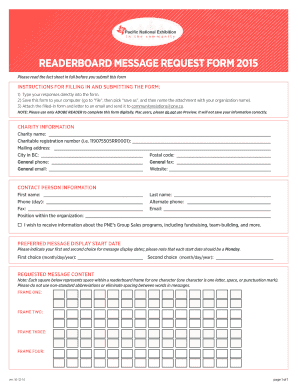
Get Readerboard Message Request Form 2015 - Pne
How it works
-

Open form follow the instructions
-

Easily sign the form with your finger
-

Send filled & signed form or save
How to fill out the READERBOARD MESSAGE REQUEST FORM 2015 - PNE online
This guide provides clear, step-by-step instructions for filling out the READERBOARD MESSAGE REQUEST FORM 2015 - PNE online. By following these instructions, users can efficiently complete and submit the form while ensuring that all necessary information is included.
Follow the steps to complete the form accurately.
- Click ‘Get Form’ button to obtain the form and open it in your selected editor.
- Type your responses directly into the form. Ensure you input all necessary data clearly and accurately.
- Save this form to your computer. Go to 'file', select 'save as', and name the attachment using your organization’s name.
- Complete the charity information section. Include your charity name, charitable registration number, mailing address, city, postal code, general phone, fax, email, and website.
- Fill in the contact person information. Provide the first name, last name, day phone, alternate phone, fax, email, and position within your organization.
- Indicate if you wish to receive information about the PNE’s Group Sales programs by checking the appropriate box.
- In the 'Preferred message display start date' section, select your first and second choices for message display dates. Remember that each start date should fall on a Monday.
- Enter the requested message content. Each square represents space for one character, so avoid non-standard abbreviations and unnecessary spacing.
- Once all sections are completed, attach the filled-in form and any accompanying letter to an email for submission.
- Send the email to communityrelations@pne.ca.
- Remember to use only Adobe Reader to complete the form digitally, as other programs may not save your information correctly.
Take the next step by filling out the READERBOARD MESSAGE REQUEST FORM 2015 - PNE online today.