Loading
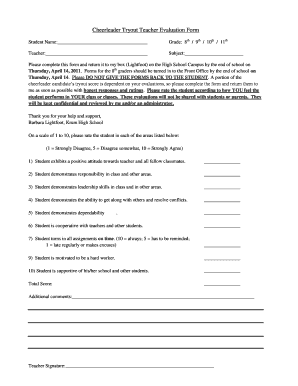
Get Cheerleader Tryout Teacher Evaluation Form - Krum Isd
How it works
-

Open form follow the instructions
-

Easily sign the form with your finger
-

Send filled & signed form or save
How to fill out the Cheerleader Tryout Teacher Evaluation Form - Krum ISD online
This guide provides clear and supportive instructions on how to complete the Cheerleader Tryout Teacher Evaluation Form for Krum ISD online. It is designed to assist teachers in accurately evaluating their students during the cheerleader tryout process.
Follow the steps to expertly complete the evaluation form.
- Press the ‘Get Form’ button to access the evaluation form and open it in your preferred editing tool.
- Begin filling in the student’s name in the designated field at the top of the form. Ensure that you write legibly to facilitate clear communication.
- Indicate the student's grade by selecting from the available options: 8th, 9th, 10th, or 11th.
- Enter your name as the teacher and specify the subject you teach related to the evaluation.
- Carefully review the instructions to ensure you complete the form in time. Remember that the forms must be returned to Barbara Lightfoot or the Front Office by the end of the school day on the specified due date.
- Rate the student on a scale of 1 to 10 in the provided sections based on your observations. Be honest and reflective in your assessments, considering each aspect of student performance.
- Provide additional comments in the allocated space if necessary, to elaborate on your ratings or offer further insights regarding the student's performance.
- Sign the form to affirm your evaluations, then review all completed sections for accuracy.
- Once the form is complete, save your changes and prepare to either download, print, or securely share the form as directed.
Complete the Cheerleader Tryout Teacher Evaluation Form online today to contribute to the selection process.