Loading
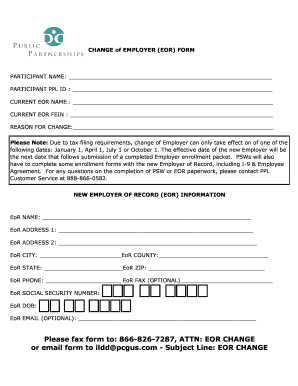
Get Change Of Eor Form - Pcg Public Partnerships
How it works
-

Open form follow the instructions
-

Easily sign the form with your finger
-

Send filled & signed form or save
How to fill out the Change Of EOR Form - PCG Public Partnerships online
Filling out the Change Of EOR Form is a crucial step in maintaining accurate employment records. This guide will help you understand each section of the form and provide clear instructions for completing it online.
Follow the steps to successfully complete the form.
- Press the ‘Get Form’ button to access the Change Of EOR Form and open it in your chosen editor.
- Begin by entering the participant's name in the designated field at the top of the form. This should include the full legal name of the person involved in the employment change.
- Next, provide the participant's PPL ID, which is essential for identifying the individual within the system.
- Fill in the current Employer of Record (EOR) name and the Employer Identification Number (FEIN) in the corresponding fields. This identifies who the participant is currently employed under.
- Indicate the reason for the change in the appropriate section. This explanation may help clarify the transition and provide context for the new EOR.
- Complete the New Employer of Record (EOR) Information section by entering the new EOR's name, address, city, county, state, and ZIP code. Make sure to fill in all fields accurately.
- Provide the new EOR's phone number, and if applicable, include their fax number. This information is helpful for further communication.
- Input the new EOR's Social Security Number and date of birth. Ensure that this information is kept secure and confidential.
- Optionally, add the new EOR's email address in the designated field for efficient electronic communication.
- After completing all required fields, review the form for accuracy and completeness before submission.
- Finally, you may save the changes, download the completed form, print it out, or share it via email or fax as instructed at the end of the document.
Start filling out the Change Of EOR Form online today to ensure a smooth transition.
How does it work? Time4Care EVV uses a clock to track your start time, end time, and total time for each shift worked. The GPS (Global Positioning System) within your smart phone or tablet captures your current location at the start and end of each shift.
Industry-leading security and compliance
US Legal Forms protects your data by complying with industry-specific security standards.
-
In businnes since 199725+ years providing professional legal documents.
-
Accredited businessGuarantees that a business meets BBB accreditation standards in the US and Canada.
-
Secured by BraintreeValidated Level 1 PCI DSS compliant payment gateway that accepts most major credit and debit card brands from across the globe.