Loading
Get Teachers Health Trust Change In Name Or Tax Id Form
How it works
-

Open form follow the instructions
-

Easily sign the form with your finger
-

Send filled & signed form or save
How to fill out the Teachers Health Trust CHANGE IN NAME OR TAX ID FORM online
Filling out the Teachers Health Trust Change in Name or Tax ID Form online is a straightforward process designed to ensure that your information is updated accurately. This guide provides detailed, step-by-step instructions to help you complete the form with confidence and ease.
Follow the steps to complete the form accurately.
- Click the ‘Get Form’ button to access the form and open it in your preferred editor.
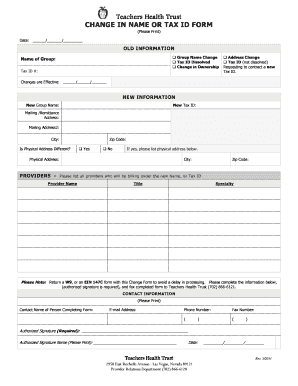
- Begin by providing the old information. Indicate any relevant changes by selecting the appropriate checkboxes for 'Group Name Change', 'Tax ID Dissolved', 'Change in Ownership', or 'Address Change'. Fill in the 'Name of Group' and 'Tax ID #' fields.
- Specify the effective date for the changes in the designated fields provided.
- Next, provide the new information. Fill in the 'New Group Name' and 'New Tax ID' fields. Include the 'Mailing/Remittance Address', 'Mailing Address 2' (if applicable), 'City', and 'Zip Code'.
- If the physical address differs from the mailing address, indicate this by selecting 'Yes' or 'No'. If 'Yes,' complete the additional fields for 'Physical Address', 'City', and 'Zip Code'.
- List all providers who will be billing under the new name or tax ID. Provide the 'Provider Name', 'Title', and 'Specialty' for each provider.
- Remember to include a W9 or an EIN 147C form with your submission to prevent processing delays. Complete the contact information fields, including 'Contact Name of Person Completing Form', 'E-mail Address', 'Phone Number', and 'Fax Number'.
- Obtain the authorized signature on the form. Print the authorized signature name below it and include the date of completion.
- After reviewing for accuracy, save your changes, and prepare to download or print the form for submission. Ensure your completed form is faxed to the Teachers Health Trust at the provided fax number.
Start filling out the Teachers Health Trust Change in Name or Tax ID Form online to ensure your information is up to date.
THT Health members have the option to enroll in the comprehensive plan which includes medical with prescription, dental, vision as well as life insurance for the Subscriber.
Industry-leading security and compliance
US Legal Forms protects your data by complying with industry-specific security standards.
-
In businnes since 199725+ years providing professional legal documents.
-
Accredited businessGuarantees that a business meets BBB accreditation standards in the US and Canada.
-
Secured by BraintreeValidated Level 1 PCI DSS compliant payment gateway that accepts most major credit and debit card brands from across the globe.