Loading
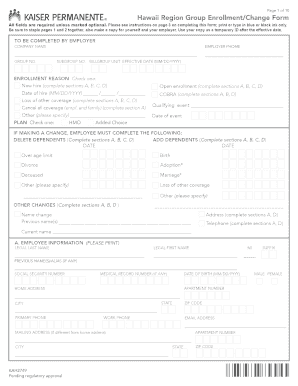
Get Page 1 Of 10 Hawaii Region Group Enrollment/change Form
How it works
-

Open form follow the instructions
-

Easily sign the form with your finger
-

Send filled & signed form or save
How to fill out the Page 1 of 10 Hawaii Region Group Enrollment/Change Form online
Filling out the Page 1 of 10 Hawaii Region Group Enrollment/Change Form online is straightforward but requires careful attention to detail. This guide will walk you through each section and field to ensure your enrollment or change request is accurately submitted.
Follow the steps to successfully complete the form.
- Click the 'Get Form' button to access the form and open it in your editor.
- Begin by entering the required employer details in the 'To be completed by employer' section, which includes the company name, group number, employer phone number, subgroup number, billing group unit, and effective date.
- In the 'Enrollment Reason' section, check one box that corresponds to your situation, such as 'New hire', 'Loss of other coverage', 'Cancel all coverage', or 'Open enrollment'. Remember to fill in any dates if applicable.
- For the 'Plan' section, select one type of plan offered (e.g., HMO or Added Choice) that meets your needs.
- If making a change to existing coverage, complete the relevant sections based on your needs, such as deleting or adding dependents in 'B. Family Information'. Provide names and Social Security numbers as necessary.
- Complete section A, 'Employee Information', which requires details like legal name, Social Security number, date of birth, home address, and contact numbers. Make sure all information is accurate and up to date.
- If your mailing address differs from your home address, ensure to fill out the mailing address section correctly.
- After completing all sections, review the entire form for any errors or omissions. It's crucial to ensure that everything is filled out correctly to avoid processing delays.
- Sign and date the form in the designated area. Remember, your application cannot be processed without your signature.
- Once everything is reviewed and signed, save your changes, then download or print the form. Ensure to keep a copy for your records before sharing it with your employer for submission.
Start completing your enrollment/change form online for a seamless experience.
Founded in 1945, Kaiser Permanente headquartered in Oakland, California, comprises: Kaiser Foundation Health Plan, Inc. Kaiser Foundation Hospitals and its subsidiaries. The Permanente Medical Groups.
Industry-leading security and compliance
US Legal Forms protects your data by complying with industry-specific security standards.
-
In businnes since 199725+ years providing professional legal documents.
-
Accredited businessGuarantees that a business meets BBB accreditation standards in the US and Canada.
-
Secured by BraintreeValidated Level 1 PCI DSS compliant payment gateway that accepts most major credit and debit card brands from across the globe.