Loading
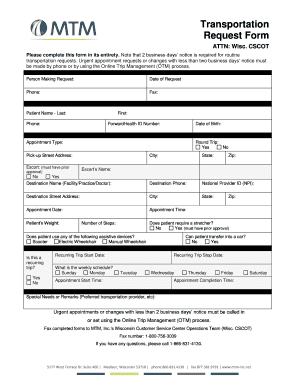
Get Mtm Transportation Request Form
How it works
-

Open form follow the instructions
-

Easily sign the form with your finger
-

Send filled & signed form or save
How to fill out the Mtm Transportation Request Form online
Completing the Mtm Transportation Request Form online can streamline the process for arranging travel. This guide provides step-by-step instructions to help make sure your request is filled out accurately and efficiently.
Follow the steps to successfully complete the form.
- Click ‘Get Form’ button to begin obtaining the form and open it for editing.
- Provide your contact information by filling in the 'Person Making Request,' 'Date of Request,' 'Phone,' and 'Fax' fields. Ensure that all information is accurate for follow-up purposes.
- Input the 'Patient Name' by entering the last name followed by the first name, and include the patient's phone number. Ensure the information matches the records for proper identification.
- Enter the patient's ForwardHealth ID number and date of birth to assist in identification and verification.
- Select the type of appointment from the 'Appointment Type' drop-down. Specify if it is a round trip by marking 'Yes' or 'No.'
- Fill in the pick-up street address, city, state, and zip code to indicate where the patient will be picked up.
- Provide the destination name (facility/practice/doctor) along with the destination's phone number and National Provider ID (NPI). Include the destination street address, city, state, and zip code.
- Specify the appointment date and time to ensure timely transportation arrangements.
- Indicate whether an escort is needed by selecting 'Yes' or 'No.' If 'Yes,' provide the escort’s name.
- Input the patient's weight and confirm if the patient can transfer into a car by selecting 'Yes' or 'No.'
- Indicate if the patient requires a stretcher and note that prior approval is needed if 'Yes.'
- If the patient uses any assistive devices such as a scooter or wheelchair, indicate which ones.
- If this is a recurring trip, fill in the 'Recurring Trip Start Date' and 'Recurring Trip Stop Date,' along with the weekly schedule for the trips.
- Provide additional information in the 'Special Needs or Remarks' section, including preferences for transportation providers or any other relevant notes.
- Once all fields have been diligently completed, save your changes, download, print, or share the form as necessary.
Start completing the Mtm Transportation Request Form online to ensure your transportation needs are met promptly.
Call 877-633-8747 (877-MED- TRIP).