Loading
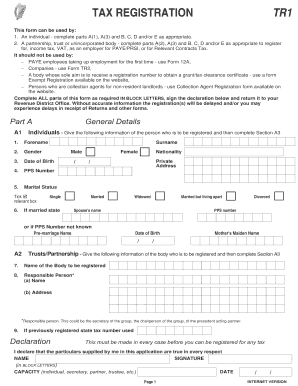
Get Tax Registration Form Tr1. This Form Can Be Used To Register For Tax
How it works
-

Open form follow the instructions
-

Easily sign the form with your finger
-

Send filled & signed form or save
How to fill out the Tax Registration Form TR1 online
Filling out the Tax Registration Form TR1 is essential for individuals and entities seeking to register for tax purposes. This guide provides clear, step-by-step instructions to help users complete the form accurately and efficiently, ensuring they meet all necessary requirements.
Follow the steps to successfully complete the Tax Registration Form TR1.
- Click ‘Get Form’ button to obtain the form and open it in the editor.
- In Part A, provide general details. If you are an individual, fill out A(1) with your forename, gender, date of birth, PPS number, marital status, surname, and your address. If you represent a partnership or trust, complete A(2) with the name of the body and details of the responsible person.
- Continue in Part A with section A3. If trading under a business name, state it clearly. Indicate the legal format of your business by ticking the appropriate box and provide your business address and phone number.
- Fill in the type of business in detail. Specify your main source of income and expected turnover. If applicable, provide adviser details of your accountant or tax adviser.
- In Part B, indicate if you are registering for income tax. Tick the box and specify your main source of income, such as trade, rental income, or investment income.
- In Part C, if registering for VAT, provide the registration date and confirm whether the registration is sought for EU acquisitions or due to exceeding turnover limits. If you are registering as a foreign business, state expected turnover from taxable supplies within the State.
- In Part D, if registering as an employer for PAYE/PRSI, indicate how many full-time and part-time employees you will have, state the date your first employee commenced, and outline your payroll record system.
- In Part E, if registering as a Principal Contractor for Relevant Contracts Tax (RCT), complete the relevant sections, including the date of commencement and the number of uncertified subcontractors you're currently engaged with.
- Review all the information you’ve entered carefully. Ensure that all parts of the form are completed in block letters as required.
- Once completed, sign the declaration and return the form to your Revenue District Office. After submission, you can save changes, download, print, or share the form as needed.
Complete your Tax Registration Form TR1 online today to ensure timely registration for tax.
To set up as a sole trader, you need to tell HMRC that you pay tax through Self Assessment. You'll need to file a tax return every year. Register for Self Assessment.
Industry-leading security and compliance
US Legal Forms protects your data by complying with industry-specific security standards.
-
In businnes since 199725+ years providing professional legal documents.
-
Accredited businessGuarantees that a business meets BBB accreditation standards in the US and Canada.
-
Secured by BraintreeValidated Level 1 PCI DSS compliant payment gateway that accepts most major credit and debit card brands from across the globe.