Loading
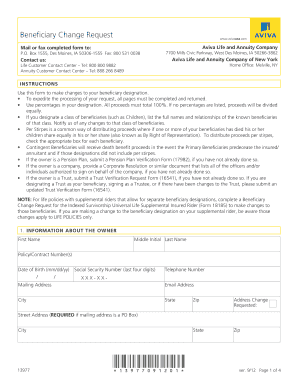
Get Aviva Beneficiary Form
How it works
-

Open form follow the instructions
-

Easily sign the form with your finger
-

Send filled & signed form or save
How to fill out the Aviva Beneficiary Form online
Completing the Aviva Beneficiary Form online is a straightforward process. This guide will walk you through each section to ensure that your beneficiary designations are submitted accurately and efficiently.
Follow the steps to complete the Aviva Beneficiary Form online.
- Click the ‘Get Form’ button to access the Aviva Beneficiary Form, which you can then open in your preferred document editor.
- Begin by providing information about the policy owner. Fill in their first and last names, middle initial, policy or contract number, date of birth, last four digits of their Social Security number, telephone number, mailing address, and email address. If the household address differs from the mailing address, indicate the required details as well.
- Next, designate the primary beneficiaries. For each beneficiary, input their name, percentage of proceeds, date of birth, street address, telephone number, relationship to the owner, and Social Security or tax identification number. Ensure that the total percentage equals 100%, and check the box for 'Distribute the proceeds per stirpes' if applicable.
- If you have additional primary beneficiaries, you may attach additional pages with the necessary details, ensuring each is labeled 'Attachment' and signed by the owner.
- Complete the contingent beneficiaries section similarly, providing all required details. This ensures that in the event of the primary beneficiaries predeceasing the insured/annuitant, the contingent beneficiaries will receive the benefits.
- In the 'Your Confirmation' section, the owner must sign and date the form, acknowledging that they revoke any existing beneficiary designations. If applicable, include signatures from joint owners and any irrevocable beneficiaries.
- If you are required to collect spousal consent, ensure that this section is filled out if you reside in a community property state, and include the spouse's signature.
- Finally, review the completed form for accuracy, save any changes, and then download or print it. Once finalized, fax or mail the completed form to the specified Aviva addresses provided in the instructions.
Complete your Aviva Beneficiary Form online today for a seamless beneficiary designation experience.
A more common example is where someone marries for a second time but has nominated their children from their first marriage. Now, it may be the case that this is still the individual's wish. However, this could be open to considerable legal challenge if the 'expression of wish' pre-dated their second marriage.