Loading
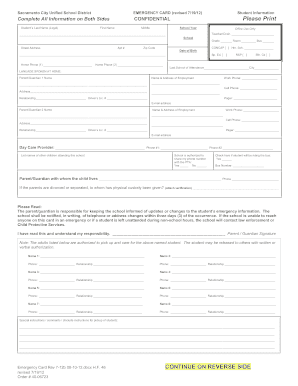
Get Emergency Card - Sacramento City Unified School District - D2qrgk75cp62ej Cloudfront
How it works
-

Open form follow the instructions
-

Easily sign the form with your finger
-

Send filled & signed form or save
How to fill out the Emergency Card - Sacramento City Unified School District - D2qrgk75cp62ej Cloudfront online
The Emergency Card for the Sacramento City Unified School District is a crucial document designed to ensure the safety and well-being of students. This guide provides step-by-step instructions on how to accurately complete the form online, helping users navigate each section effectively.
Follow the steps to fill out the Emergency Card correctly.
- Click ‘Get Form’ button to obtain the form and open it in the editor.
- Begin by filling out the student's information, including their last name, first name, and middle name in the designated fields. Ensure that all details are printed clearly.
- Provide the school year and information such as the teacher or counselor's name, the school name, grade, room, and bus number. Add the student's street address, apartment number, and zip code.
- Enter the student's date of birth, including two home phone numbers. Indicate if the student is involved in special education through the provided checkboxes.
- List the names and addresses of both parents or guardians, including their employment details, work phone numbers, cell phone numbers, and any other relevant contact information.
- Specify the name and phone number of the day care provider, if applicable, along with a list of any other siblings attending the same school.
- Indicate whether the school is authorized to share your phone number with the PTA and if the student will be riding the bus, including the bus number.
- Complete the section regarding custody arrangements if applicable, and ensure to sign the provided acknowledgment of responsibility.
- On the reverse side, fill in the health information section. Indicate any health problems or conditions, and list all medications your child takes, including dosage.
- Check off any relevant health conditions from the checklist provided and include special instructions regarding health needs. Make sure to provide physician details for emergency authorization.
- Lastly, review all information for accuracy and completeness, then save changes, download, print, or share the completed form as required.
Complete the Emergency Card and submit it online to ensure your child's safety and access to necessary care.
Folsom-Cordova Unified - School Directory Details (CA Dept of Education)
Industry-leading security and compliance
US Legal Forms protects your data by complying with industry-specific security standards.
-
In businnes since 199725+ years providing professional legal documents.
-
Accredited businessGuarantees that a business meets BBB accreditation standards in the US and Canada.
-
Secured by BraintreeValidated Level 1 PCI DSS compliant payment gateway that accepts most major credit and debit card brands from across the globe.