Loading
Get Payroll Journal Entry Form - Adminfin.sc.edu - Adminfin Sc
How it works
-

Open form follow the instructions
-

Easily sign the form with your finger
-

Send filled & signed form or save
How to fill out the PAYROLL JOURNAL ENTRY FORM - Adminfin.sc.edu - Adminfin Sc online
This guide provides a detailed walkthrough on how to correctly complete the Payroll Journal Entry Form. By following the outlined steps, you will ensure accurate processing of payroll adjustments.
Follow the steps to successfully complete the Payroll Journal Entry Form.
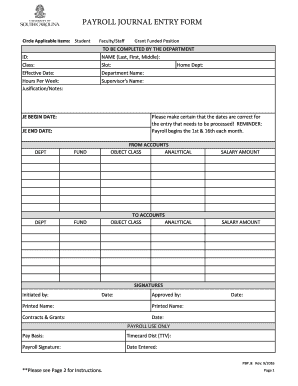
- Press the ‘Get Form’ button to access the Payroll Journal Entry Form and open it in your editing tool.
- Circle the applicable item based on the employee's status: student, faculty/staff, or grant-funded position.
- Enter the employee's USC ID in the designated field.
- Input the employee's full name in the format Last, First, Middle.
- Specify the employee's job class to indicate the position pertaining to the journal entry.
- Provide the employee's slot number, which corresponds to their position.
- Indicate the home department number assigned to the employee.
- Fill in the effective date of the journal entry, ensuring it aligns with the payroll schedule.
- State the department name in which the employee is working.
- Record the weekly hours the employee is expected to work.
- Provide the supervisor's name in the appropriate section.
- Use the justification/notes field to include any relevant information or details necessary for processing the entry.
- Enter the journal entry begin and end dates, making sure they relate to the pay period dates.
- List the accounts that were initially charged for salary and fringe expenses under 'From Accounts' along with the corresponding salary amount.
- In the 'To Accounts' section, provide the accounts where the expenses need to be moved, ensuring amounts match the 'From Accounts' section.
- Gather the necessary signatures from the person who initiated the entry and the approving individual, including printing their names.
- In cases where Contracts & Grants approval is needed, attach the relevant justifications and ensure it is sent to the Payroll Office for processing.
- Review all filled information for accuracy, and once confirmed, save your changes, download, print, or share the completed form as required.
Complete your Payroll Journal Entry Form online today and ensure your payroll adjustments are processed efficiently.
2022-2023 Estimated Cost ExpenseEstimated CostTuition and Technology Fee*$33,928Housing$8,992Meals$4,340Books and Supplies$1,3121 more row