Loading
Get Download - Megastaffing
How it works
-

Open form follow the instructions
-

Easily sign the form with your finger
-

Send filled & signed form or save
How to fill out the Download - MegaStaffing online
Filling out the Download - MegaStaffing form is an essential part of initiating the background check process for individuals seeking employment in positions that involve direct care or supervision. This guide provides clear, step-by-step instructions to help you complete the form accurately and efficiently.
Follow the steps to successfully complete the Download - MegaStaffing form.
- Press the ‘Get Form’ button to access the form and open it in an editor.
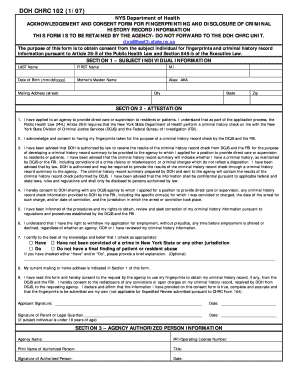
- In Section 1, provide your personal information, including your last name, first name, middle initial, date of birth, mother's maiden name, any aliases, and your complete mailing address, including street, city, state, and zip code.
- Proceed to Section 2 for the attestation. Read each statement carefully and acknowledge your understanding by checking the appropriate boxes. Ensure that you consent to the criminal history check and confirm that your information is accurate.
- If applicable, check the box indicating whether you have been convicted of a crime or have a final finding of patient or resident abuse. If you check 'Have' or 'Do,' provide a brief explanation in the space provided.
- Ensure your current mailing or home address is recorded in Section 1. This is crucial for the agency to contact you regarding your application.
- Sign the form in the designated area to affirm that the information you provided is complete and accurate. If the subject individual is under 18 years of age, a parent or legal guardian must sign as well.
- Complete Section 3 by providing the agency's name and the authorized person’s information, including their print name, title, signature, and date.
- Once all sections are filled, review the entire form thoroughly. Save changes, download the completed form, and print or share it with the agency as needed.
Begin filling out the Download - MegaStaffing form online to ensure a smooth application process.
It is important to note that the basic free storage of MEGA is 15GB among 50GB, which you can use for a lifetime. The other 35GB will expire after a 180-day login. But you can participate in the achievement programs to gain extra free space.