Loading
Get Kit Rental Form - Falcon Paymasters
How it works
-

Open form follow the instructions
-

Easily sign the form with your finger
-

Send filled & signed form or save
How to fill out the Kit Rental Form - Falcon Paymasters online
Filling out the Kit Rental Form - Falcon Paymasters online is a straightforward process designed to help users efficiently submit their rental details. This guide will walk you through each section of the form, ensuring that you complete it accurately and effectively.
Follow the steps to complete your Kit Rental Form online.
- Press the ‘Get Form’ button to download the Kit Rental Form and open it in your preferred editor.
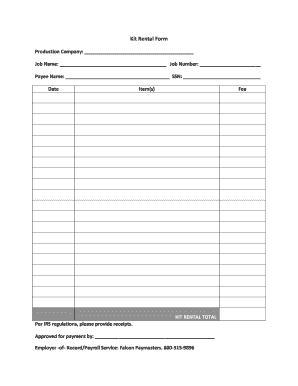
- In the 'Production Company' section, enter the name of the production company associated with the rental.
- Fill in the 'Job Name' field with the title of the job for which the kit is being rented.
- Provide the 'Job Number' relevant to the rental in the specified section.
- Enter the 'Payee Name', which is the individual or entity that will receive payment.
- In the 'SSN' field, input the social security number of the payee, ensuring all digits are accurately recorded.
- Write the current date in the designated area to denote when the form is completed.
- List the 'Item(s)' being rented, detailing each kit or component clearly, along with the corresponding fee for each.
- Calculate the 'KIT RENTAL TOTAL' by summing the fees listed in the previous section.
- Note that per IRS regulations, it is necessary to include receipts, which must be attached when submitting the form.
- In the 'Approved for payment by' section, include the name of the individual authorized to approve the payment.
- Lastly, indicate the 'Employer-of-Record/Payroll Service' and include contact information for Falcon Paymasters at 800-515-9896. The form can now be saved, downloaded, printed, or shared as needed.
Complete your Kit Rental Form online today!
Related links form
NEW PATIENT REGISTRATION - Commonwealth Eye Surgery
Guidance Material And Best Practices For Aircraft Leases
TRANSCRIPT ORDER FORM To Request A Transcript, Please Complete This Form And Mail To: Office Of
CC160036 - Building Surveyor Construction Certificate Permit - 16 Coventry Pl LAKE ALBERT NSW 2650