Loading
Get Incretin Mimetics Prior Authorization Request Form ... - Optumrx
How it works
-

Open form follow the instructions
-

Easily sign the form with your finger
-

Send filled & signed form or save
How to fill out the Incretin Mimetics Prior Authorization Request Form - OptumRx online
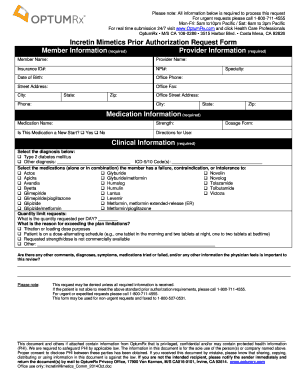
Filling out the Incretin Mimetics Prior Authorization Request Form is an essential step in securing medication coverage for patients. This guide will walk you through each section of the form, ensuring you provide all required information for a smooth submission process.
Follow the steps to accurately complete the form.
- Press the ‘Get Form’ button to access the necessary document and open it for editing.
- Begin by filling out the member information, including the member's name, insurance ID number, date of birth, and street address.
- Next, input the provider information, ensuring to include the provider's name, National Provider Identifier (NPI) number, office phone, fax, and street address.
- Proceed to the medication information section. Specify the medication name and strength, indicate whether this is a new start with a Yes or No selection, provide directions for use, and state the dosage form.
- In the clinical information section, select the appropriate diagnosis, indicating if the diagnosis is Type 2 diabetes mellitus or another condition. If ‘Other diagnosis’ is selected, provide the diagnosis and the corresponding ICD-9/10 codes.
- Indicate any medications that the member has failed, has a contraindication against, or has demonstrated intolerance to by checking the relevant boxes.
- For quantity limit requests, specify the quantity requested per day and the reason for exceeding the plan limitations by checking the applicable options.
- Provide any additional comments or important information regarding diagnoses, symptoms, or previously tried medications in the space provided at the end of the form.
- Finally, review all entered information for accuracy. Save changes, and choose the option to download, print, or share the completed form as needed.
Complete your forms online to streamline the authorization process.
Learn more at optum.com. How long does it take for a prior authorization to be approved or denied? Once your PA has been submitted and received, it usually takes up to 24 hours to process. If your PA request needs additional review, it may take longer.