Loading
Get Application Pdf - Pennrose
How it works
-

Open form follow the instructions
-

Easily sign the form with your finger
-

Send filled & signed form or save
How to fill out the Application PDF - Pennrose online
This guide provides clear instructions on how to complete the Application PDF - Pennrose online. By following the structured steps, users can fill out the form efficiently and accurately.
Follow the steps to successfully complete your application.
- Press the ‘Get Form’ button to access the Application PDF - Pennrose and open it in your editing tool.
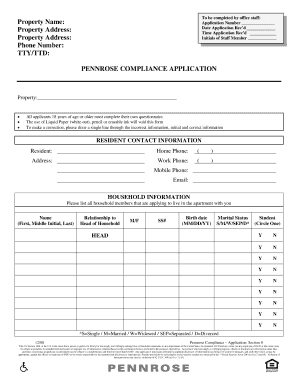
- Begin by filling in your application number, the date and time you are submitting your application, and the initials of the staff member receiving it.
- Provide the property name and address where you wish to apply, including your contact information such as phone number and TTY/TTD if applicable.
- Each applicant aged 18 years or older must complete their own questionnaire. Note that using correction fluid or erasable ink will void the form. To correct an error, cross out the incorrect information, initial it, and write the error-free information.
- Fill out the resident contact information, including your name, home phone number, and any additional phone numbers you wish to provide.
- List all household members applying to live in the apartment with you, including their names, relationships, gender, social security numbers, birth dates, marital status, whether they are students, and their respective statuses.
- Complete the general information section, answering questions about pets, bankruptcy filings, felony convictions, evictions, or drug offenses. Provide details if you answer 'Yes' to any of these questions.
- Fill out the housing references section, providing information about your past and current residences, including addresses, landlord contacts, and duration of stay.
- Provide details of your emergency contact, who is different from those listed on your application, along with their relationship to you and their contact numbers.
- Fill out the income information section by detailing all sources of income for household members aged 18 or older. Include information about employment, self-employment, benefits, child support, and any other types of income.
- Provide information on assets held by all household members, including checking/savings accounts, stocks, retirement accounts, and value of personal property held as an investment.
- Answer all eligibility questions related to student status, rental assistance, and any other necessary qualifications.
- Sign and date the application. All adult household members must sign to certify that the information provided is accurate and complete.
- Finally, review your application for accuracy. Once completed, you can save changes, download, print, or share the form as needed.
Complete your documents online today to ensure a smooth application process.