Loading
Get Illinicare Change Pcp Form
How it works
-

Open form follow the instructions
-

Easily sign the form with your finger
-

Send filled & signed form or save
How to fill out the Illinicare Change PCP Form online
Filling out the Illinicare Change PCP Form online can be a straightforward process when approached step by step. This guide aims to provide you with clear instructions on how to complete each section of the form efficiently.
Follow the steps to successfully complete your form.
- To obtain the form, press the ‘Get Form’ button and open the document in the editor.
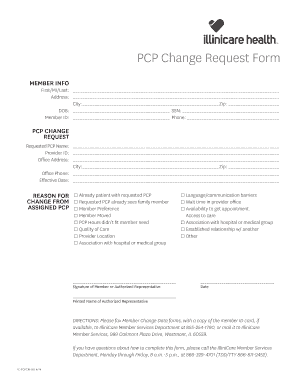
- Begin by filling in the member information section. You will need to include your first name, middle initial, last name, address, city, zip code, date of birth, Social Security Number, member ID, and phone number.
- Next, move to the PCP change request section. Input the requested PCP name, provider ID, office address, city, zip code, and office phone number. Specify the effective date for the change in PCP.
- Indicate the reason for changing from the assigned PCP by checking the appropriate box. Options may include being an established patient with the requested PCP, preference, relocation, or issues related to quality of care or accessibility.
- If applicable, provide your signature or the signature of an authorized representative along with the printed name of the representative.
- Finally, review the completed form to ensure all sections are filled out accurately. You may now save changes, download, print, or share the form as needed.
Complete your Illinicare Change PCP Form online today to ensure your healthcare needs are met.
You can change your doctor, for any reason, once a month. To change your doctor, call the Illinois Health Connect Helpline at 1-877-912-1999. If you use a TTY, call 1-866-565-8577. The call is free.