Loading
Form preview
  • US Legal Forms
  • Form Library
  • More Forms
  • More Uncategorized Forms
  • Ogslp Loan Maintenance Form - Ocap

Get Ogslp Loan Maintenance Form - Ocap

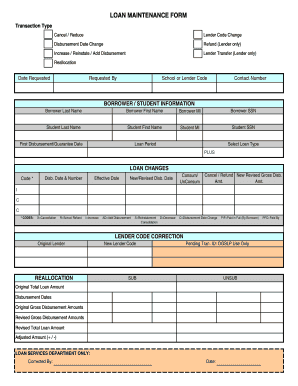
LOAN MAINTENANCE FORM Transaction Type Cancel / Reduce Lender Code Change Disbursement Date Change Refund (Lender only) Increase / Reinstate / Add Disbursement Lender Transfer (Lender only) Reallocation.

How it works

  1. Open form

    Open form follow the instructions

  2. Easily sign form

    Easily sign the form with your finger

  3. Share form

    Send filled & signed form or save

How to fill out the OGSLP Loan Maintenance Form - Ocap online

Filling out the OGSLP Loan Maintenance Form - Ocap online can seem overwhelming, but understanding each section will make the process smoother. This guide provides clear, step-by-step instructions designed to assist users in completing the form accurately and efficiently.

Follow the steps to complete the OGSLP Loan Maintenance Form - Ocap online.

  1. Click ‘Get Form’ button to obtain the form and open it in the editing interface.
  2. Begin by selecting the transaction type from the options provided, such as Cancel/Reduce, Lender Code Change, or Increase/Reinstate/Add Disbursement. Ensure that the appropriate choice reflects your request.
  3. Enter the 'Date Requested' and 'Requested By' fields accurately. This information helps process your request promptly.
  4. Provide your school or lender code along with a contact number to facilitate further communication regarding your request.
  5. In the 'Borrower/Student Information' section, enter the last name, first name, middle initial (MI), and Social Security Number (SSN) of both the borrower and the student. Ensure that all details are correct to avoid processing delays.
  6. Specify the first disbursement/guarantee date and the loan period. This information is crucial for tracking the timeline of the loan.
  7. Select the loan type from the given choices, including PLUS, ensuring that your selection aligns with your loan agreement.
  8. In the loan changes section, fill out the relevant fields, such as 'Code,' 'Disb. Date & Number,' and 'Effective Date.' Refer to the codes provided for accuracy in your request, such as 'X' for Cancellation or 'I' for Increase.
  9. For reallocations, input the original lender, new lender code, and any pending transaction ID required for internal processing.
  10. Complete the sections on original total loan amounts, disbursement dates, and revised gross disbursement amounts as needed.
  11. After reviewing all the information you've provided, you can save your changes, download the completed form, print it, or share the form through the available options.

Start completing the OGSLP Loan Maintenance Form - Ocap online today!

Get form

Experience a faster way to fill out and sign forms on the web. Access the most extensive library of templates available.
Get form

Related content

OCAP Online News - Oklahoma Digital Prairie
Oct 6, 2011 — service providers and gather information and resources to support your...
Learn more
About the ... - Oklahoma State Regents for Higher...
OCAP, an operating division of the State Regents and formerly known as the Oklahoma...
Learn more

Related links form

43L Amp 43LX Alpha One - Brunswick Marine In EMEA ELECTROLYSIS G10 Worksheet For Electrloysis Osd Calculation Reading Writing And The Regrettable Status Of Education Research In Comparative Politics Annu Rev

Get This Form Now!

Use professional pre-built templates to fill in and sign documents online faster. Get access to thousands of forms.
Get form
If you believe that this page should be taken down, please follow our DMCA take down processhere.
Get OGSLP Loan Maintenance Form - Ocap
Get form
  • Adoption
  • Bankruptcy
  • Contractors
  • Divorce
  • Home Sales
  • Employment
  • Identity Theft
  • Incorporation
  • Landlord Tenant
  • Living Trust
  • Name Change
  • Personal Planning
  • Small Business
  • Wills & Estates
  • Packages A-Z
  • Affidavits
  • Bankruptcy
  • Bill of Sale
  • Corporate - LLC
  • Divorce
  • Employment
  • Identity Theft
  • Internet Technology
  • Landlord Tenant
  • Living Wills
  • Name Change
  • Power of Attorney
  • Real Estate
  • Small Estates
  • Wills
  • All Forms
  • Forms A-Z
  • Form Library
  • Legal Hub
  • About Us
  • Help Portal
  • Legal Resources
  • Blog
  • Affiliates
  • Contact Us
  • Delete My Account
  • Site Map
  • Industries
  • Forms in Spanish
  • Localized Forms
  • State-specific Forms
  • Forms Kit
  • Real Estate Handbook
  • All Guides
  • Notarize
  • Incorporation services
  • For Consumers
  • For Small Business
  • For Attorneys
  • USLegal
  • FormsPass
  • pdfFiller
  • signNow
  • altaFlow
  • DocHub
  • Instapage
Form Packages
  • Adoption
  • Bankruptcy
  • Contractors
  • Divorce
  • Home Sales
  • Employment
  • Identity Theft
  • Incorporation
  • Landlord Tenant
  • Living Trust
  • Name Change
  • Personal Planning
  • Small Business
  • Wills & Estates
  • Packages A-Z
Form Categories
  • Affidavits
  • Bankruptcy
  • Bill of Sale
  • Corporate - LLC
  • Divorce
  • Employment
  • Identity Theft
  • Internet Technology
  • Landlord Tenant
  • Living Wills
  • Name Change
  • Power of Attorney
  • Real Estate
  • Small Estates
  • Wills
  • All Forms
  • Forms A-Z
  • Form Library
Customer Service
  • Legal Hub
  • About Us
  • Help Portal
  • Legal Resources
  • Blog
  • Affiliates
  • Contact Us
  • Delete My Account
  • Site Map
  • Industries
  • Forms in Spanish
  • Localized Forms
  • State-specific Forms
  • Forms Kit
Legal Guides
  • Real Estate Handbook
  • All Guides
Prepared for you
  • Notarize
  • Incorporation services
Our Customers
  • For Consumers
  • For Small Business
  • For Attorneys
Our Sites
  • USLegal
  • FormsPass
  • pdfFiller
  • signNow
  • altaFlow
  • DocHub
  • Instapage
Social Media
Call us now toll free:
+1 833 426 79 33
As seen in:
© Copyright 1999-2026 airSlate Legal Forms, Inc. 17 Station Street, Suite 303, Brookline, MA 02445
  • Your Privacy Choices
  • Terms of Service
  • Privacy Notice
  • Content Takedown Policy
  • Bug Bounty Program