Loading
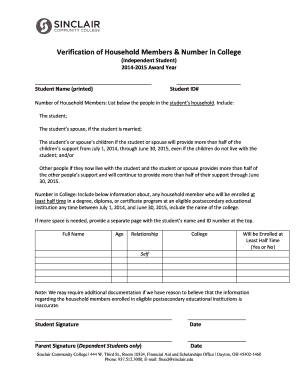
Get Verification Of Household Members-independent Form - Sinclair ... - Sinclair
How it works
-

Open form follow the instructions
-

Easily sign the form with your finger
-

Send filled & signed form or save
How to fill out the verification of household members-independent form - Sinclair online
Completing the verification of household members-independent form is a crucial step for students seeking financial aid. This guide will assist you in accurately filling out this form to ensure that you provide the necessary information for your application.
Follow the steps to effectively complete the form.
- Click the ‘Get Form’ button to access the form. This action will allow you to open the verification document in your preferred editor.
- In the first section, print your name clearly on the designated line where it states 'Student Name.' This ensures that your form is easily identifiable.
- Next, enter your Student ID number in the designated space. This information links your form to your student record.
- For the number of household members, list each individual who resides with you. Make sure to include yourself, your spouse (if applicable), and any dependents for whom you provide substantial support.
- Specify any additional individuals living with you who rely on you or your spouse for more than half of their financial support. This is crucial for accurate household composition.
- In the 'Number in College' section, provide details for any household members who will be enrolled at least half-time in a postsecondary educational institution between July 1, 2014, and June 30, 2015. This includes their full name, age, relationship to you, name of their college, and if they will be enrolled at least half-time.
- If you require additional space for any member's information, attach a separate page with your name and student ID at the top for reference.
- Once you have filled out the form, proceed to sign the document in the signature area provided. Ensure the signature aligns with the name you printed at the beginning.
- Record the date of your signature on the designated line. It is important to indicate when the form was completed.
- If you are a dependent student, a parent must also sign and date the form in the indicated areas.
- After verifying all information is correct, save your changes, then download, print, or share the completed form as necessary.
Take the next step in securing your financial aid by completing the verification form online.
To be considered for readmission, you must: Take any required placement tests. Call 937-512-3700 to schedule an appointment with an Academic Advisor on the Dayton Campus to begin the readmission process or meet with an Academic Advisor at one of our Regional Centers.
Industry-leading security and compliance
US Legal Forms protects your data by complying with industry-specific security standards.
-
In businnes since 199725+ years providing professional legal documents.
-
Accredited businessGuarantees that a business meets BBB accreditation standards in the US and Canada.
-
Secured by BraintreeValidated Level 1 PCI DSS compliant payment gateway that accepts most major credit and debit card brands from across the globe.