Loading
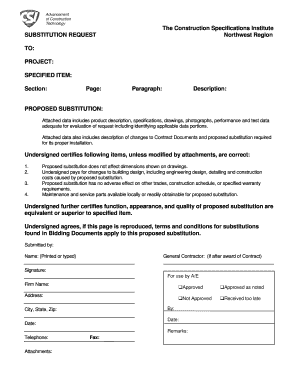
Get Substitution Request Northwest Region To Project
How it works
-

Open form follow the instructions
-

Easily sign the form with your finger
-

Send filled & signed form or save
How to fill out the SUBSTITUTION REQUEST Northwest Region TO PROJECT online
This guide provides a step-by-step approach to filling out the SUBSTITUTION REQUEST Northwest Region TO PROJECT form online. By following these instructions, users can ensure that all necessary information is accurately provided for review and approval.
Follow the steps to complete the SUBSTITUTION REQUEST form efficiently.
- Click ‘Get Form’ button to obtain the form and open it in the editor.
- Fill in the 'TO:' section with the relevant project or individual’s name that you are addressing the request to.
- In the 'PROJECT:' field, specify the name of the project related to the substitution request.
- Complete the 'SPECIFIED ITEM:' section with the name and details of the item for which a substitution is being requested.
- Indicate the 'Section:', 'Page:', and 'Paragraph:' numbers from the original contract documents that reference the specified item.
- Provide a detailed 'Description:' of the proposed substitution, including key features and benefits.
- Fill out the 'PROPOSED SUBSTITUTION:' section, ensuring to attach any supporting data such as product descriptions, specifications, drawings, photographs, and performance test data that aids in the evaluation of the request.
- Ensure to detail any changes to Contract Documents required for the proper installation of the proposed substitution.
- In the certification section, list the items certifying accuracy of the provided information, marking each as required.
- Indicate that the proposed substitution does not affect dimensions shown on drawings and that maintenance and service parts are available locally.
- In the signature section, type or print the name of the person submitting the request, along with the designation of the General Contractor if applicable.
- Sign the form and include the date of submission.
- Once completed, the form can be saved, downloaded, printed, or shared as required.
Take action now and complete your SUBSTITUTION REQUEST online to ensure a smoother project workflow.
Substitutions: Changes in products, materials, equipment, and methods of construction required by Contract Documents proposed by Contractor after award of Contract are considered to be requests for substitutions.
Industry-leading security and compliance
US Legal Forms protects your data by complying with industry-specific security standards.
-
In businnes since 199725+ years providing professional legal documents.
-
Accredited businessGuarantees that a business meets BBB accreditation standards in the US and Canada.
-
Secured by BraintreeValidated Level 1 PCI DSS compliant payment gateway that accepts most major credit and debit card brands from across the globe.