Loading
Get English Application - Freeman Health System
How it works
-

Open form follow the instructions
-

Easily sign the form with your finger
-

Send filled & signed form or save
How to fill out the English Application - Freeman Health System online
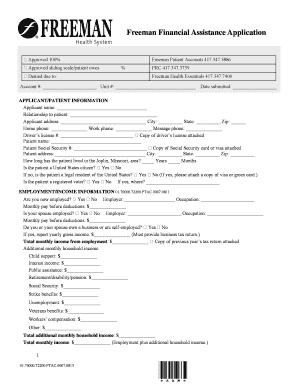
Filling out the English Application for Freeman Health System online can seem daunting, but this guide will provide clear, step-by-step instructions to assist you in successfully completing the application. Ensure you have all necessary information and documentation ready to streamline the process.
Follow the steps to fill out the application completely and accurately.
- Press the ‘Get Form’ button to access the application form and open it in your designated editor.
- Begin by entering your account number, unit number, and the date you are submitting the application. This information helps in tracking and processing your application.
- In the applicant/patient information section, input the applicant's name, relationship to the patient, and the applicant's address including city, state, and zip code.
- Provide contact information including the home phone, work phone, and a message phone for easier communication.
- Complete the driver's license section by providing the driver's license number. Attach a copy if required.
- Fill out the patient's name, Social Security number, and address in appropriate spaces. Ensure to attach a copy of the Social Security card or visa as mentioned.
- Indicate how long the patient has resided in the Joplin, Missouri area by filling in the years and months fields.
- Answer questions regarding the patient's citizenship status and provide necessary documentation if the patient is not a citizen.
- In the employment/income information section, specify whether the applicant or their spouse is currently employed, along with their occupation and monthly pay before deductions.
- List additional household income sources such as child support, public assistance, and any other relevant income.
- In the household information section, list all dependents along with their names, ages, and relationship to the applicant.
- Complete the asset statement section, including home ownership status, property details, and accounts.
- In the applicant acknowledgment section, read through the statement, sign, and date the application as confirmation of the information's accuracy.
- Finally, review the application for any missing information or documents. After ensuring everything is complete, save your changes, and choose to download, print, or share the form as needed.
Begin filling out your application online today to access financial assistance if you qualify.
Freeman operates two campuses in Joplin and a satellite hospital in Neosho, Missouri. The largest hospital in the system, Freeman West, is a 339-bed teaching hospital with a 41-bed ICU. With over 3000 employees, the hospital system is the largest employer in the Joplin area.
Industry-leading security and compliance
US Legal Forms protects your data by complying with industry-specific security standards.
-
In businnes since 199725+ years providing professional legal documents.
-
Accredited businessGuarantees that a business meets BBB accreditation standards in the US and Canada.
-
Secured by BraintreeValidated Level 1 PCI DSS compliant payment gateway that accepts most major credit and debit card brands from across the globe.