Loading
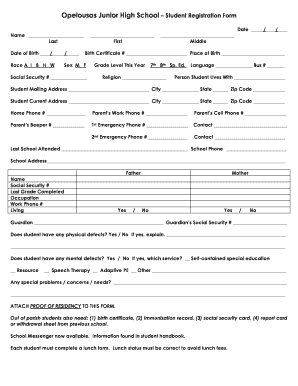
Get Opelousas Junior Registration Form
How it works
-

Open form follow the instructions
-

Easily sign the form with your finger
-

Send filled & signed form or save
How to fill out the Opelousas Junior Registration Form online
Filling out the Opelousas Junior Registration Form online is a straightforward process. This guide will provide you with comprehensive, step-by-step instructions to ensure you complete the form accurately and efficiently.
Follow the steps to successfully complete the registration form
- Press the ‘Get Form’ button to acquire the registration form and open it in your preferred application.
- Enter the student's name in the designated fields. Ensure you provide the last name first, followed by the first name and middle name.
- Fill in the date of birth using the correct format. Indicate the race by selecting from the options provided: A, I, B, H, or W.
- Provide the birth certificate number and place of birth in the appropriate fields.
- Indicate the student's sex by selecting either 'M' for male or 'F' for female.
- Enter the student’s social security number in the corresponding field.
- Select the grade level for this year from the options: 7th, 8th, or Special Education. Also, indicate the language and bus number, if applicable.
- Fill in the student’s religion and the name of the person the student lives with.
- Complete the student’s mailing address and current address, including city, state, and zip code.
- Enter the home phone number, parent's work phone number, and cell phone number.
- Provide the first and second emergency contact numbers along with names of the contacts.
- List the last school attended, along with the school’s phone number and address.
- Fill in the father’s and mother’s information, including name, social security number, last grade completed, occupation, and work phone number. Indicate whether the parents are living together.
- If applicable, provide the guardian's information along with their social security number.
- Answer the health-related questions regarding physical or mental defects, and specify any special needs if applicable.
- Remember to attach proof of residency to the form. Out of parish students will need additional documentation. Additionally, complete the lunch form to ensure correct lunch status.
- After filling out all sections of the form, you can save changes, download, print, or share the document as needed.
Begin completing the Opelousas Junior Registration Form online today!
Industry-leading security and compliance
US Legal Forms protects your data by complying with industry-specific security standards.
-
In businnes since 199725+ years providing professional legal documents.
-
Accredited businessGuarantees that a business meets BBB accreditation standards in the US and Canada.
-
Secured by BraintreeValidated Level 1 PCI DSS compliant payment gateway that accepts most major credit and debit card brands from across the globe.