Loading
Get Pre-certification Request Form - Freedom Health
How it works
-

Open form follow the instructions
-

Easily sign the form with your finger
-

Send filled & signed form or save
How to fill out the PRE-CERTIFICATION REQUEST FORM - Freedom Health online
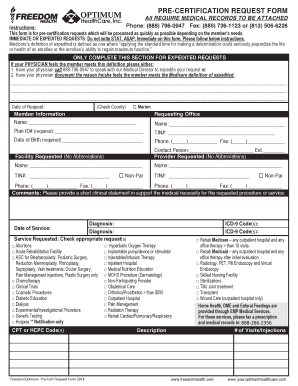
This guide will provide you with clear and step-by-step instructions on how to accurately complete the Pre-Certification Request Form for Freedom Health online. By following these directions, you will ensure that your pre-certification requests are processed efficiently and accurately.
Follow the steps to fill out the form correctly.
- Click ‘Get Form’ button to obtain the form and open it for editing.
- Begin by filling out the date of the request.
- Next, provide the member information including their name, plan ID number, and date of birth in the designated fields.
- In the requesting office section, enter the name of the office, tax identification number (TIN), phone number, and fax number.
- For the facility requested, fill in the contact person's name and extension, along with the provider's name and TIN.
- Check the box for Non-Participating Provider if applicable.
- In the comments section, provide a brief clinical statement supporting the medical necessity for the requested procedure or service.
- List the diagnosis related to the request in the designated areas.
- Select the appropriate service(s) requested by checking the corresponding box(es) available.
- Indicate the date of service.
- Fill in the CPT or HCPC code(s) and ICD-9 code(s) where required.
- Once all necessary information is completed, save your changes, and you may choose to download, print, or share the form as needed.
Take the first step and complete your Pre-Certification Request Form online today.
Freedom Health and Optimum HealthCare are part of an Elevance Health company that offers a broad portfolio of affordable and benefit-rich Medicare Advantage plans throughout Florida.