Loading
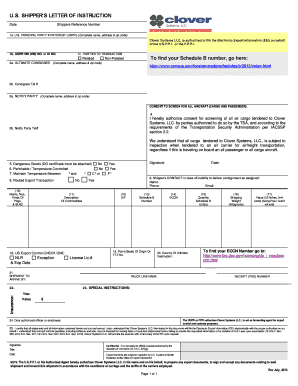
Get Shipper S Letter Of Instructions. Form No: 2015 Rev. 03/1/04
How it works
-

Open form follow the instructions
-

Easily sign the form with your finger
-

Send filled & signed form or save
How to fill out the SHIPPER S LETTER OF INSTRUCTIONS. Form No: 2015 Rev. 03/1/04 online
Completing the SHIPPER S LETTER OF INSTRUCTIONS, Form No: 2015 Rev. 03/1/04, is essential for ensuring the accurate and efficient handling of your export documentation. This guide provides step-by-step instructions to assist users in filling out the form correctly online.
Follow the steps to successfully complete your form.
- Click ‘Get Form’ button to access the form and open it in your preferred online editor.
- Enter the date in the appropriate field. This indicates when the instructions are being filled out.
- Fill in the shipper's reference number, which helps in tracking the shipment for internal records.
- Provide the complete name, address, and zip code of the U.S. Principal Party in Interest (USPPI) in section 1a. This entity is primarily responsible for the export.
- Enter the USPPI's Employer Identification Number (EIN) or ID number in section 1b to verify their identity with tax authorities.
- Indicate whether the transaction parties are related or non-related in section 1c by checking the appropriate box.
- In section 2a, provide the complete name, address, and zip code of the ultimate consignee, who is the final recipient of the goods.
- Include the consignee's telephone number in section 2b for communication regarding the shipment.
- Complete section 3a with the name, address, and zip code of any notifying party who should be contacted regarding the shipment.
- In section 3b, enter the notifying party’s telephone number.
- Authorize screening for all air cargo in section 4 by acknowledging with your signature, allowing TSA compliance.
- Indicate if there are dangerous goods in section 5 and attach the appropriate DG certificate if necessary.
- For perishable or temperature-controlled items, answer questions in sections 6 and 7. Specify the required temperature range.
- If applicable, check ‘Routed Export Transaction’ in section 8 and provide additional information in subsequent sections if needed.
- Provide details in section 11 about the description of commodities being exported.
- Input any necessary export licensing information in sections 12 and 14, including License numbers or ECCN.
- Complete sections 15-17 with quantity, shipping weight, and value information, ensuring accuracy to avoid complications.
- Fill in the country of ultimate destination in section 20, and make sure all shipping methods comply with regulations.
- In section 23, add any special instructions that should be followed during the shipping process.
- Sign and date the form at the designated signature section, certifying that all information is accurate.
- Review all entered information for completeness and accuracy before finalizing your submission.
- Once confirmed, save changes, download the completed form, or print it for your records or submission.
Start filling out your SHIPPER S LETTER OF INSTRUCTIONS online today for a seamless export process.
The Shipper's Letter of Instruction (SLI) can be used to provide Expeditors with all required data elements for transmission of the Electronic Export Information (EEI) as well as shipping instructions if Expeditors is acting as forwarding agent.
Industry-leading security and compliance
US Legal Forms protects your data by complying with industry-specific security standards.
-
In businnes since 199725+ years providing professional legal documents.
-
Accredited businessGuarantees that a business meets BBB accreditation standards in the US and Canada.
-
Secured by BraintreeValidated Level 1 PCI DSS compliant payment gateway that accepts most major credit and debit card brands from across the globe.