Loading
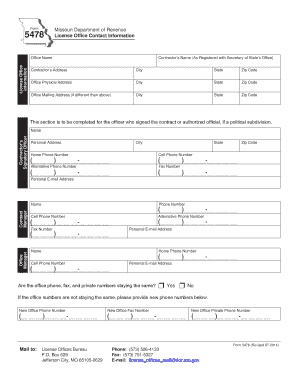
Get Form 5478 License Office Contact Information - Missouri Department ... - Dor Mo
How it works
-

Open form follow the instructions
-

Easily sign the form with your finger
-

Send filled & signed form or save
How to fill out the Form 5478 License Office Contact Information - Missouri Department of Revenue online
Filling out the Form 5478 License Office Contact Information is a crucial step for individuals and organizations interacting with the Missouri Department of Revenue. This guide will help you understand how to complete the form accurately and efficiently.
Follow the steps to complete the form online.
- Click ‘Get Form’ button to obtain the form and open it for editing.
- Begin with the 'Office Name' section at the top of the form. Enter the name of your license office as officially registered.
- In the 'Contractor’s Name' field, provide the name as registered with the Secretary of State’s Office. Follow this with the address details, including 'Contractor’s Address', 'City', 'State', and 'Zip Code'.
- Fill out the 'Office Physical Address' section with the necessary details: 'City', 'State', and 'Zip Code'. If the office mailing address differs from the physical address, complete the 'Office Mailing Address' section with the appropriate information.
- Next, provide information for the 'Contractor’s Signatory Officer', including their name, personal address, home phone number, cell phone number, and alternative phone number, if applicable.
- Include the 'Fax Number' for the signatory officer as needed and their personal email address.
- Proceed to the 'Contract Manager' section. Fill in their name, phone number, cell phone number, and fax number, similar to previous sections.
- Do the same for the 'Office Manager' section, ensuring you capture their name, phone number, cell phone number, and personal email address.
- Indicate whether the office phone, fax, and private numbers are staying the same by selecting 'Yes' or 'No'. If they are changing, list the new numbers in the designated fields.
- After completing all fields, review the information for accuracy. Once confirmed, save the changes as necessary. You can download, print, or share the form as required.
Complete your documents online to ensure a smooth submission process.
Replacing a Lost/Stolen/Destroyed Missouri Driver License or Nondriver License. You may apply and pay for a replacement driver license or nondriver license at any Missouri license office. For more information on replacing the lost, stolen, or destroyed license, visit the Frequently Asked Question page.
Industry-leading security and compliance
US Legal Forms protects your data by complying with industry-specific security standards.
-
In businnes since 199725+ years providing professional legal documents.
-
Accredited businessGuarantees that a business meets BBB accreditation standards in the US and Canada.
-
Secured by BraintreeValidated Level 1 PCI DSS compliant payment gateway that accepts most major credit and debit card brands from across the globe.