Loading
Get Cscl/pps-020 (3/14) - Michigan
How it works
-

Open form follow the instructions
-

Easily sign the form with your finger
-

Send filled & signed form or save
How to fill out the CSCL/PPS-020 (3/14) - Michigan online
Filling out the CSCL/PPS-020 (3/14) form can be a straightforward process when you follow the necessary steps. This guide will provide clear instructions to help users navigate the form efficiently and accurately, ensuring compliance with Michigan regulations.
Follow the steps to successfully complete the form online.
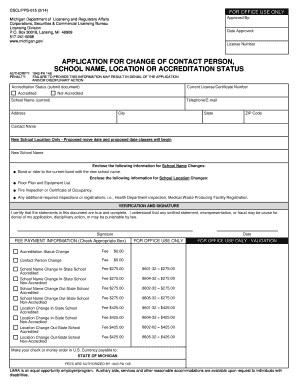
- Click the 'Get Form' button to access the CSCL/PPS-020 (3/14) - Michigan form in your preferred online platform.
- Start by providing your current school name in the designated field to ensure accurate identification of your application.
- Enter your current license or certificate number in the appropriate section to link your application to existing records.
- Fill out the contact information section, including telephone and email, to allow for easy communication regarding your application.
- If you are submitting a school name change, please provide documentation such as a bond or rider associated with the new school name.
- For a change in school location, include additional documents like a floor plan, equipment list, and any relevant inspections (e.g., fire inspection, health department registration).
- Verify that all information is accurate and complete in the verification and signature section, then sign and date the document.
- Review the fee payment information to select the appropriate box based on your application type and prepare payment in U.S. currency as indicated.
- Once all sections are completed, save your changes, and you can download, print, or share the document as needed.
Start filling out the CSCL/PPS-020 (3/14) online today to ensure your application is processed without delay.