Loading
Get Dpicrc Form.doc
How it works
-

Open form follow the instructions
-

Easily sign the form with your finger
-

Send filled & signed form or save
How to fill out the DPICRC Form.doc online
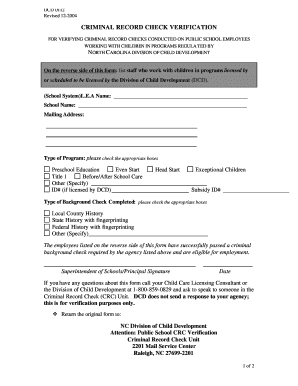
Filling out the DPICRC Form online is a vital step for verifying criminal record checks on public school employees working with children. This guide will provide you with a clear, step-by-step process to confidently complete the form.
Follow the steps to successfully complete the DPICRC Form
- Click the ‘Get Form’ button to obtain the DPICRC Form and open it in your preferred online document editor.
- Begin by filling in the 'School System' and 'L.E.A Name' fields with the relevant information about your school or district.
- Enter the 'School Name' as it appears in official records.
- Provide the mailing address for the school, ensuring all details are accurate for correspondence.
- Check the corresponding box for the type of program you are verifying, such as Preschool Education, Before/After School Care, or any other specified category.
- If applicable, provide the ID number if your program is licensed by the Division of Child Development.
- Indicate the type of background check completed by checking the appropriate boxes, which include Local County History, State History with fingerprinting, and Federal History with fingerprinting. Specify any other type if necessary.
- Upon verifying that all listed employees on the reverse side have successfully passed the background check, obtain the required signature from the Superintendent of Schools or Principal.
- Insert the date next to the signature to finalize the form.
- Retain a copy of the completed form for your records, then proceed to return the original to the indicated address of the NC Division of Child Development.
Complete your documents online today for efficient processing!