Loading
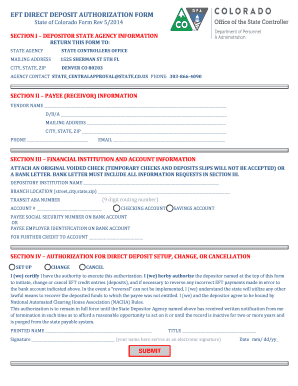
Get Eft Direct Deposit Authorization Form - Colorado.gov - Colorado
How it works
-

Open form follow the instructions
-

Easily sign the form with your finger
-

Send filled & signed form or save
How to fill out the EFT DIRECT DEPOSIT AUTHORIZATION FORM - Colorado.gov - Colorado online
Filling out the EFT Direct Deposit Authorization Form is a straightforward process that allows users to authorize direct deposits into their bank accounts from a state agency. This guide provides step-by-step instructions to ensure that you complete the form correctly and efficiently.
Follow the steps to complete your EFT Direct Deposit Authorization Form.
- Press the ‘Get Form’ button to access and view the EFT Direct Deposit Authorization Form online.
- In Section I, provide the depositor state agency information. Enter the name of the state agency that you are dealing with and its contact details, including the mailing address, city, state, and ZIP code. Ensure you include the agency's contact email and phone number for any inquiries.
- Proceed to Section II to fill in the payee (receivor) information. Input the vendor name and any ‘doing business as’ (D/B/A) names. Follow up with your complete mailing address, including city, state, ZIP code, phone number, and email.
- Move on to Section III and provide financial institution and account information. Attach a voided check or a bank letter that includes all requested information. Enter your depository institution name, branch location, the 9-digit routing number, and your account number. Indicate whether the account is a checking or savings account. Include the payee's Social Security number or Employer Identification number associated with the bank account.
- In Section IV, select the appropriate option for authorization: set up, change, or cancel. Review the certification statement, sign where indicated, and include your printed name, title, and the date.
- Finally, save your completed form. You can choose to download, print, or share it as necessary before returning it to the designated state agency.
Complete the EFT Direct Deposit Authorization Form online today for a seamless banking experience.
A direct deposit authorization form is a document that authorizes a third (3rd) party, usually an employer for payroll, to send money to a bank account by simply using the ABA routing and account numbers. Sometimes the employer will require a voided check to ensure that the account is valid.