Loading
Get Police Report Nj
How it works
-

Open form follow the instructions
-

Easily sign the form with your finger
-

Send filled & signed form or save
How to fill out the Police Report Nj online
Completing the Police Report Nj is an essential task for those applying for firearms in New Jersey. This guide provides clear instructions on how to accurately fill out the form online, ensuring that all necessary information is captured correctly.
Follow the steps to complete your application effectively.
- Click ‘Get Form’ button to obtain the form and open it in the editor.
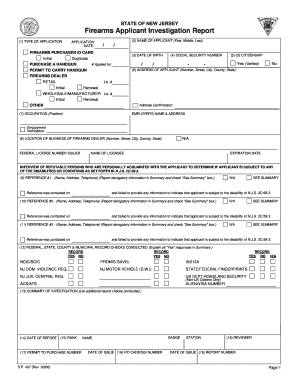
- Begin by indicating the type of application you are submitting. You will need to specify whether you are applying for a firearms purchaser ID card, a permit to carry a handgun, or another category.
- Enter your name in the designated fields, including first, middle, and last names. Ensure the information matches your identification documents.
- Fill in your date of birth in the provided format and double-check for accuracy.
- Provide your Social Security number in the required format, ensuring that it is entered correctly without any mistakes.
- Indicate your citizenship status by selecting 'Yes' or 'No.' If applicable, include verification documentation for 'Yes.'
- Input your current address, including the number, street, city, county, and state. Confirm that the address is correct.
- Enter your occupation and position in the corresponding field, if applicable.
- If you are applying as a firearms dealer, fill in the location of your business address along with your federal license number.
- Provide the names and contact information for at least three reputable persons who can vouch for you. Ensure that you document if any were contacted and report their feedback in the summary section.
- Complete the section about federal, state, county, and municipal record checks, indicating 'Yes' or 'No' for each item listed. If you answer 'Yes' to any, be prepared to explain these in the summary.
- Summarize your investigation findings as required on the form. Include the date of the report and details about the conducting officer's rank and badge.
- After reviewing all the filled-out sections, ensure that all information is accurate. Save your changes, then proceed to download, print, or share the form.
Start completing your Police Report Nj online today to ensure a smooth application process.
Contact the New Jersey e-Government Services Helpdesk at 609-586-2600 or use our contact form. For questions about non-toll road crash reports, boat crash reports and record requests for serious/fatal crash reports: Contact the New Jersey State Police at 609-882-2000 ext. 2234.