Loading
Form preview
  • US Legal Forms
  • Other Templates
  • More Forms
  • More Uncategorized Forms
  • Download The Inventory Form - Hazardous Substances Toolbox

Get Download The Inventory Form - Hazardous Substances Toolbox

Below a code snippet for downloading a file from a web server to a local file. Itdemonstrates useful customizations of the request (such as setting a UserAgentand Referrer, often required by web sites),.

How it works

  1. Open form

    Open form follow the instructions

  2. Easily sign form

    Easily sign the form with your finger

  3. Share form

    Send filled & signed form or save

How to use or fill out the Download The Inventory Form - Hazardous Substances Toolbox online

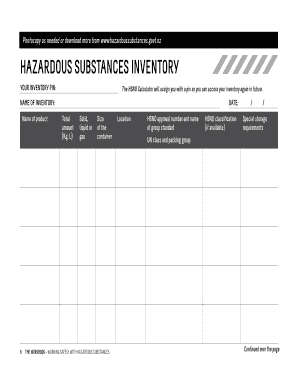
Filling out the Download The Inventory Form - Hazardous Substances Toolbox online is an essential task for managing hazardous substances effectively. This guide provides clear, step-by-step instructions to help users complete the form accurately and efficiently.

Follow the steps to fill out the hazardous substances inventory form correctly.

  1. Press the ‘Get Form’ button to access the inventory form and open it in your editor.
  2. Enter your inventory PIN. This unique identifier assigned by the hsno calculator will ensure you can easily access your inventory in the future.
  3. Complete the field for the name of the inventory. Specify the name of the product being documented.
  4. In the 'Date' section, fill in the current date when you are completing the inventory.
  5. Provide the total amount of the substance you are inventorying. Enter the quantity in kilograms or liters.
  6. Identify the state of the substance (solid, liquid, or gas) and enter it in the corresponding field.
  7. Fill in the size of the container that holds the hazardous substance.
  8. Specify the location where the hazardous substance is stored.
  9. Enter the HSNO approval number along with the name of the group standard applicable to the substance.
  10. If available, provide the HSNO classification of the substance in the designated area.
  11. Lastly, detail any special storage requirements necessary for the safe storage of the substance.
  12. Once all fields are completed, save your changes. You can also download, print, or share the filled form as needed.

Start filling out your hazardous substances inventory form online today!

Get form

Experience a faster way to fill out and sign forms on the web. Access the most extensive library of templates available.
Get form

Related content

Hazard Communication Program - OSHA
Copies of the written program, including the written chemical inventory list ... to...
Learn more
Chemical Inventory and Safety Data Sheets (SDS ...
Classifying the potential hazards of chemicals and communicating information ... Download...
Learn more
Wikipedia:Chemical infobox - Wikipedia
This also applies to the information in the Hazards section, which is provided for...
Learn more

Related links form

Tuition Deferment Authorization Form - Ridgewater College - Ridgewater Section 13 2 Paleozoic Era Life Explodes 13 1 Precambrian Time Vast And Puzzling Chapter 12 Geologic Time Section 123 Dating With - Fusd1

Questions & Answers

Get answers to your most pressing questions about US Legal Forms API.

Contact support

Safety data sheets (SDSs) provide useful information on chemicals, describing the hazards the chemical presents, and giving information on handling, storage and emergency measures in case of an accident. SDSs may include further information on safe handling, in the form of exposure scenarios.

All materials that are toxic, oxidizing, corrosive, reactive, carcinogenic, or flammable, as well as any liquids and gases under pressure, including liquid nitrogen tanks and compressed air cylinders, are required to be in Chemicals.

What is it? A hazardous chemical inventory list is simply a list of all products your practice has that have hazardous properties. The hazardous chemical inventory list is an OSHA-required item—and one of the first things an OSHA inspector will want to see.

A Safety Data Sheet (SDS) is a document that provides health and safety information about products, substances or chemicals that are classified as hazardous substances or dangerous goods.

A complete chemical inventory includes the product name of each chemical as well as the chemical manufacturer's name and contact information. It should include information about where a chemical is stored or used and indicate whether a material safety data sheet is on file for the chemical.

Safety Data Sheets (SDS) The purpose of a Safety Data Sheet (SDS), formerly known as Material Safety Data Sheets (MSDS), is to provide information on the hazards of working with a chemical and procedures that should be used to ensure safety.

The SDS contains information on the identity of the product and any hazardous ingredients, potential health effects, toxicological properties, physical hazards, safe use, handling and storage, emergency procedures, and disposal requirements specific to the chemical.

Get This Form Now!

Use professional pre-built templates to fill in and sign documents online faster. Get access to thousands of forms.
Get form
If you believe that this page should be taken down, please follow our DMCA take down processhere.
Get Download The Inventory Form - Hazardous Substances Toolbox
Get form
  • Adoption
  • Bankruptcy
  • Contractors
  • Divorce
  • Home Sales
  • Employment
  • Identity Theft
  • Incorporation
  • Landlord Tenant
  • Living Trust
  • Name Change
  • Personal Planning
  • Small Business
  • Wills & Estates
  • Packages A-Z
  • Affidavits
  • Bankruptcy
  • Bill of Sale
  • Corporate - LLC
  • Divorce
  • Employment
  • Identity Theft
  • Internet Technology
  • Landlord Tenant
  • Living Wills
  • Name Change
  • Power of Attorney
  • Real Estate
  • Small Estates
  • Wills
  • All Forms
  • Forms A-Z
  • Other Templates
  • Legal Hub
  • About Us
  • Help Portal
  • Legal Resources
  • Blog
  • Affiliates
  • Contact Us
  • Delete My Account
  • Site Map
  • Industries
  • Forms in Spanish
  • Localized Forms
  • State-specific Forms
  • Forms Kit
  • Real Estate Handbook
  • All Guides
  • Notarize
  • Incorporation services
  • For Consumers
  • For Small Business
  • For Attorneys
  • USLegal
  • FormsPass
  • pdfFiller
  • signNow
  • altaFlow
  • DocHub
  • Instapage
Form Packages
  • Adoption
  • Bankruptcy
  • Contractors
  • Divorce
  • Home Sales
  • Employment
  • Identity Theft
  • Incorporation
  • Landlord Tenant
  • Living Trust
  • Name Change
  • Personal Planning
  • Small Business
  • Wills & Estates
  • Packages A-Z
Form Categories
  • Affidavits
  • Bankruptcy
  • Bill of Sale
  • Corporate - LLC
  • Divorce
  • Employment
  • Identity Theft
  • Internet Technology
  • Landlord Tenant
  • Living Wills
  • Name Change
  • Power of Attorney
  • Real Estate
  • Small Estates
  • Wills
  • All Forms
  • Forms A-Z
  • Other Templates
Customer Service
  • Legal Hub
  • About Us
  • Help Portal
  • Legal Resources
  • Blog
  • Affiliates
  • Contact Us
  • Delete My Account
  • Site Map
  • Industries
  • Forms in Spanish
  • Localized Forms
  • State-specific Forms
  • Forms Kit
Legal Guides
  • Real Estate Handbook
  • All Guides
Prepared for you
  • Notarize
  • Incorporation services
Our Customers
  • For Consumers
  • For Small Business
  • For Attorneys
Our Sites
  • USLegal
  • FormsPass
  • pdfFiller
  • signNow
  • altaFlow
  • DocHub
  • Instapage
Social Media
Call us now toll free:
+1 833 426 79 33
As seen in:
© Copyright 1999-2026 airSlate Legal Forms, Inc. 17 Station Street, Ste. 203, Brookline, MA 02445
  • Your Privacy Choices
  • Terms of Service
  • Privacy Notice
  • Content Takedown Policy
  • Bug Bounty Program