Loading
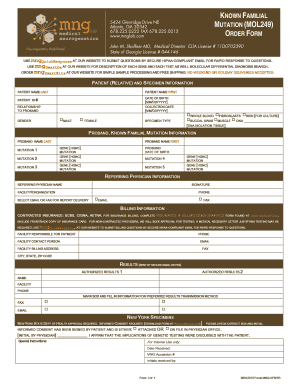
Get Test Mol249 Mng
How it works
-

Open form follow the instructions
-

Easily sign the form with your finger
-

Send filled & signed form or save
How to fill out the Test Mol249 Mng online
Filling out the Test Mol249 Mng form online is a straightforward process that allows for the easy submission of patient and specimen information. This guide provides step-by-step instructions to assist you in completing the form accurately and efficiently.
Follow the steps to fill out the Test Mol249 Mng form online
- Press the 'Get Form' button to access the Test Mol249 Mng document and open it in your preferred editor.
- Begin by entering the patient (relative) and specimen information. Fill in the patient’s first and last name, patient ID number, and date of birth, formatted as MM/DD/YYYY. Indicate the relationship to the proband and the collection date.
- Select the patient's gender by checking the appropriate box for either 'Male' or 'Female'. Then, specify the specimen type by checking one of the options provided, such as 'Whole Blood', 'Fibroblasts', 'Skin for Culture', 'Buccal Swab', 'Muscle', or 'DNA'.
- Next, input the proband's known familial mutation information. Provide the proband's first and last name and fill out the details for each mutation, listing gene and mutation information for up to five mutations.
- Complete the referring physician's information by entering their name, facility or organization, phone number, and selecting the preferred method of report delivery—either 'Email' or 'Fax'.
- In the billing information section, specify the contracted insurance provider if applicable and provide the necessary insurance and billing demographics. Note that a copy of the insurance card is required.
- Indicate the facility responsible for payment by filling in the facility contact person's email, phone number, billing address, and any other required information.
- For results delivery, mark the preferred transmission method by checking the appropriate box and providing the relevant details for authorized results.
- If your specimen is from New York, ensure that informed consent has been obtained and mark the corresponding box. Initial to confirm consent is either attached or on file.
- Review all entered information for accuracy. Once satisfied with the details, save changes, download, print, or share the form as needed.
Complete your documents online for a streamlined submission process.
Industry-leading security and compliance
US Legal Forms protects your data by complying with industry-specific security standards.
-
In businnes since 199725+ years providing professional legal documents.
-
Accredited businessGuarantees that a business meets BBB accreditation standards in the US and Canada.
-
Secured by BraintreeValidated Level 1 PCI DSS compliant payment gateway that accepts most major credit and debit card brands from across the globe.