Loading
Get Fortleecu
How it works
-

Open form follow the instructions
-

Easily sign the form with your finger
-

Send filled & signed form or save
How to fill out the Fortleecu online
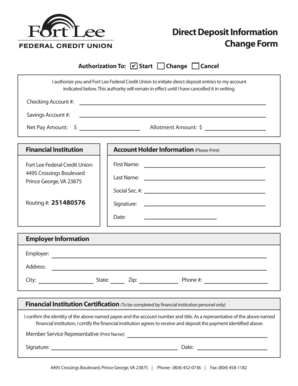
This guide provides clear and detailed instructions for completing the Fortleecu form. Whether you are initiating, changing, or canceling a direct deposit, this step-by-step approach will help you navigate the process with ease.
Follow the steps to fill out the Fortleecu form online
- Press the ‘Get Form’ button to access the Fortleecu form and open it in your preferred editing tool.
- Begin by marking the appropriate authorization type: 'Start,' 'Change,' or 'Cancel' under the 'Authorization To' section.
- Provide your direct deposit information: enter your checking account number and savings account number in the designated fields.
- Specify the desired net pay amount and the allotment amount in the respective sections.
- Fill out your account holder information by printing your first name, last name, and social security number clearly.
- Enter the routing number provided (251480576) to ensure proper processing of deposits.
- Sign and date the form to authorize the direct deposit.
- Complete the employer information section: input the employer's name, address, city, state, zip code, and contact phone number.
- If applicable, have a representative from the financial institution fill out the certification section, confirming the details you provided.
- Once all sections are completed and verified, you can save changes, download, print, or share the completed form as needed.
Complete your Fortleecu form online today!
A secured personal loan is backed by collateral. If the borrower defaults, the lender can collect the collateral. For this reason, secured loans tend to offer better rates than unsecured loans.