Loading
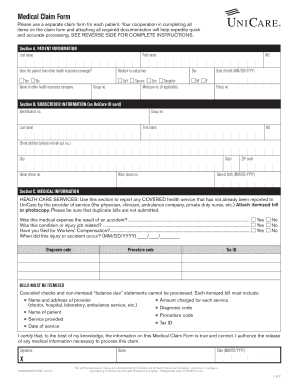
Get Medical Claim Form - Unicare
How it works
-

Open form follow the instructions
-

Easily sign the form with your finger
-

Send filled & signed form or save
How to fill out the Medical Claim Form - UniCare online
Filling out a Medical Claim Form - UniCare is an essential step for obtaining reimbursements for healthcare services. This guide provides a clear step-by-step process to help you complete the form accurately and efficiently.
Follow the steps to complete your Medical Claim Form efficiently.
- Click ‘Get Form’ button to obtain the form and open it in your editor.
- Begin with Section A, where you will provide patient information. Fill in the last name, first name, and indicate if the patient has other health insurance coverage. Include the name of the other health insurance company and the relationship to the subscriber, if applicable.
- Proceed to Section B for subscriber information. Here, you will need to input the identification number from the UniCare ID card, the subscriber's last name, first name, and middle initial, along with the date of birth. Be sure to fill out the policy number and group number as well as the complete address and contact information.
- In Section C, document the medical information. Report any covered health services that have not been billed to UniCare. Attach itemized bills and ensure there are no duplicate submissions. You must designate if the expenses were the result of an accident or job-related injuries, and provide the relevant diagnosis and procedure codes.
- At the end of the form, certify the information provided is accurate. Include your signature, printed name, and date of signing.
- Finally, review all completed sections to ensure accuracy. You can then save changes, download the form, print it, or share it as necessary.
Start filling out your Medical Claim Form online today for quicker processing!
UniCare has an A+ rating with the Better Business Bureau (BBB), and there are only three complaints on file in the past three years.