Loading
Form preview
  • US Legal Forms
  • Other Templates
  • More Forms
  • More Uncategorized Forms
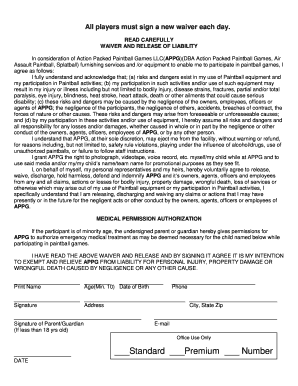
  • Paintball Tucson Waiver Form

Get Paintball Tucson Waiver Form

Paintball, Splatball) furnishing services and /or equipment to enable me to participate in paintball games, I agree as follows: I fully understand and acknowledge that; (a) risks and dangers exist in my use of Paintball equipment and my participation in Paintball activities; (b) my participation in such activities and/or use of such equipment may result in my injury or illness including but not limited to bodily injury, disease strains, fractures, partial and/or total paralysis, eye injury, bli.

How it works

  1. Open form

    Open form follow the instructions

  2. Easily sign form

    Easily sign the form with your finger

  3. Share form

    Send filled & signed form or save

How to fill out the Paintball Tucson Waiver Form online

Completing the Paintball Tucson Waiver Form online is a straightforward process that requires careful attention to detail. This guide will walk you through each section of the form, ensuring you understand what information is necessary for participation in paintball activities.

Follow the steps to complete the waiver form successfully.

  1. Click ‘Get Form’ button to access the waiver form and open it in your editing interface.
  2. Begin by entering your full name in the designated field. Ensure the name matches the identification you will present at the venue.
  3. Indicate your age in the provided section. Please remember that participants must be a minimum of 10 years old.
  4. Fill in your date of birth by selecting the appropriate day, month, and year from the dropdown menus or typing them in manually.
  5. Provide your complete address, including street, city, state, and zip code, in the designated fields.
  6. Enter your phone number to ensure the facility can reach you for any necessary communications.
  7. Include your email address, as it may be used for confirmation or further communication from the facility.
  8. If you are under 18 years of age, a parent or guardian must sign the waiver. Ensure they fill in their name and signature in the appropriate section.
  9. After completing all the fields, review the information for accuracy and completeness to avoid any issues on the day of your participation.
  10. Once satisfied with your entries, you have the option to save changes, download, print, or share the form as needed.

Complete your Paintball Tucson Waiver Form online today to ensure a smooth experience during your paintball activities.

Get form

Experience a faster way to fill out and sign forms on the web. Access the most extensive library of templates available.
Get form

Related content

Spring 2016 - Arizona Department of Child Safety...
Jan 27, 2016 — CarePortal Launches in Tucson ▫ 2. Assisting Youth with College Apps...
Learn more
Discounts for attractions | Business and Finance
Project request form · Writing and webpage style guide ... Phoenix Rock Gym, Phoenix Zoo...
Learn more
SBC RU 252 Premium Tv List - UserManual.wiki
File Type : PDF File Type Extension : pdf MIME Type : application/pdf PDF Version : 1.5...
Learn more

Related links form

Mmra Bellingham Engineering Aug2009 Ok.doc Water Reuse And Environmental Conservation Project - USAID - Pdf Usaid Mod.C1001264 Alt U Fixo 0116

Questions & Answers

Get answers to your most pressing questions about US Legal Forms API.

Contact support

Types of SOWs There are several different types of SOW documents available, each with its own advantages. The three main types of statement of work agreements are design, level of effort, and performance-based SOWs. Design: Design SOWs are focused on the design and development of a product or service.

Elements of an SOW can include: Purpose of the project. Scope of work being performed. Location of the project, project length, and any work requirements. Expected deadlines and deliverables. Acceptance criteria. Any hardware and software required. Performance-based standards to be met.

That said, almost all SOWs will include seven elements: the Scope of Work, deliverables, time and resources, payment terms, client services, changes, and terms and conditions.

Pitfalls in Creating a Statement of Work If the work statement is too vague, too broad, or too generic, it can leave room for multiple interpretations. This can create misunderstandings later in a project.

A statement of work (SOW) is a document routinely employed in the field of project management. It is the narrative description of a project's work requirement. It defines project-specific activities, deliverables and timelines for a vendor providing services to the client.

A Statement of Work, often known as an SOW, is a business agreement that outlines deliverables and project goals. It's created to keep everyone on the same page about deadlines, scope of work, and project expectations. Creating an SOW helps clients and vendors to stay aligned and reach their project goals together.

The scope section of the SOW describes project outcomes and the type of work that will be done to achieve them.

Statement of Work Types There are three main types of statement of work: Functional SOW. Performance SOW. Design SOW.

Get This Form Now!

Use professional pre-built templates to fill in and sign documents online faster. Get access to thousands of forms.
Get form
If you believe that this page should be taken down, please follow our DMCA take down processhere.
Get Paintball Tucson Waiver Form
Get form
  • Adoption
  • Bankruptcy
  • Contractors
  • Divorce
  • Home Sales
  • Employment
  • Identity Theft
  • Incorporation
  • Landlord Tenant
  • Living Trust
  • Name Change
  • Personal Planning
  • Small Business
  • Wills & Estates
  • Packages A-Z
  • Affidavits
  • Bankruptcy
  • Bill of Sale
  • Corporate - LLC
  • Divorce
  • Employment
  • Identity Theft
  • Internet Technology
  • Landlord Tenant
  • Living Wills
  • Name Change
  • Power of Attorney
  • Real Estate
  • Small Estates
  • Wills
  • All Forms
  • Forms A-Z
  • Other Templates
  • Legal Hub
  • About Us
  • Help Portal
  • Legal Resources
  • Blog
  • Affiliates
  • Contact Us
  • Delete My Account
  • Site Map
  • Industries
  • Forms in Spanish
  • Localized Forms
  • State-specific Forms
  • Forms Kit
  • Real Estate Handbook
  • All Guides
  • Notarize
  • Incorporation services
  • For Consumers
  • For Small Business
  • For Attorneys
  • USLegal
  • FormsPass
  • pdfFiller
  • signNow
  • altaFlow
  • DocHub
  • Instapage
Form Packages
  • Adoption
  • Bankruptcy
  • Contractors
  • Divorce
  • Home Sales
  • Employment
  • Identity Theft
  • Incorporation
  • Landlord Tenant
  • Living Trust
  • Name Change
  • Personal Planning
  • Small Business
  • Wills & Estates
  • Packages A-Z
Form Categories
  • Affidavits
  • Bankruptcy
  • Bill of Sale
  • Corporate - LLC
  • Divorce
  • Employment
  • Identity Theft
  • Internet Technology
  • Landlord Tenant
  • Living Wills
  • Name Change
  • Power of Attorney
  • Real Estate
  • Small Estates
  • Wills
  • All Forms
  • Forms A-Z
  • Other Templates
Customer Service
  • Legal Hub
  • About Us
  • Help Portal
  • Legal Resources
  • Blog
  • Affiliates
  • Contact Us
  • Delete My Account
  • Site Map
  • Industries
  • Forms in Spanish
  • Localized Forms
  • State-specific Forms
  • Forms Kit
Legal Guides
  • Real Estate Handbook
  • All Guides
Prepared for you
  • Notarize
  • Incorporation services
Our Customers
  • For Consumers
  • For Small Business
  • For Attorneys
Our Sites
  • USLegal
  • FormsPass
  • pdfFiller
  • signNow
  • altaFlow
  • DocHub
  • Instapage
Social Media
Call us now toll free:
+1 833 426 79 33
As seen in:
© Copyright 1999-2026 airSlate Legal Forms, Inc. 17 Station Street, Ste. 203, Brookline, MA 02445
  • Your Privacy Choices
  • Terms of Service
  • Privacy Notice
  • Content Takedown Policy
  • Bug Bounty Program