Loading
Get Enquiry On Results Ielts
How it works
-

Open form follow the instructions
-

Easily sign the form with your finger
-

Send filled & signed form or save
How to fill out the Enquiry On Results IELTS online
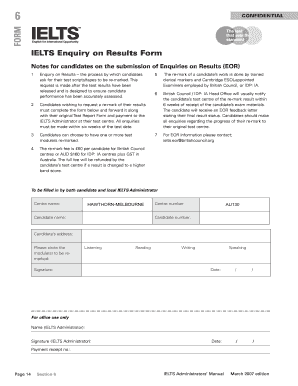
The Enquiry on Results IELTS form allows candidates to request a re-mark of their test results to ensure accuracy in their assessment. This guide provides step-by-step instructions to help users complete the form online effectively.
Follow the steps to complete your Enquiry on Results form.
- Click the ‘Get Form’ button to access the form and open it for completion.
- Fill in your personal details, including your name, address, candidate number, and the name and number of the center where you took the test.
- Indicate the module you wish to have re-marked by circling the appropriate option: Listening, Reading, Writing, or Speaking.
- Sign the form to confirm your request for a re-mark. Ensure your signature matches the one on your original Test Report Form.
- Include the date of your request in the designated field, ensuring it is within six weeks of your test date.
- Attach your original Test Report Form and include the relevant payment information for the re-mark fee.
- Review the completed form for accuracy and completeness before submission.
- Once satisfied, save changes, download, print, or share the form as needed, and send it to the IELTS Administrator at your test center.
Complete your Enquiry on Results form online today to ensure your test performance is accurately assessed.
Your result may not be issued 13 days after the test if the IELTS Test Partners decide that it is necessary to review any matter associated with your test or the administration of your test. To assist any investigation, you may be required to provide writing and speaking samples.