Loading
Get Enroll Patient In Labsync:
How it works
-

Open form follow the instructions
-

Easily sign the form with your finger
-

Send filled & signed form or save
How to fill out the Enroll Patient In LabSync: online
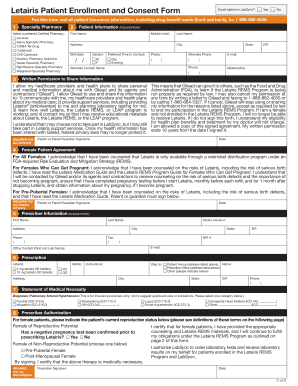
Filling out the Enroll Patient In LabSync form is an essential step in facilitating patient enrollment for support services. This guide provides clear, step-by-step instructions to help users complete the online form efficiently and accurately.
Follow the steps to complete the enrollment form.
- Press the ‘Get Form’ button to access the Enroll Patient In LabSync form and open it in your preferred online editor.
- Select a preferred certified pharmacy from the list provided. This selection is crucial as it influences where the medication will be filled.
- In the Patient Information section, carefully print the patient's first name, last name, middle initial, address, city, state, ZIP code, date of birth, gender, preferred time to contact, and both phone numbers. Ensure that all information is accurate and complete to avoid any processing delays.
- Verify the Written Permission to Share Information section. The patient must consent to sharing their personal and medical information with Gilead and its agents by signing this section.
- For female patients, complete the Female Patient Agreement section carefully, ensuring that all necessary counseling has been acknowledged. This section may involve a guardian's signature if the patient is a minor.
- Enter the Prescriber Information with the prescriber's first and last name, address, phone number, fax number, and NPI number. This section is critical for facilitating communications between healthcare providers.
- Fill out the Prescription details for , including dosage and number of refills. Make sure to indicate shipping preferences for the medication.
- In the Statement of Medical Necessity, mark the appropriate diagnosis for insurance purposes. This ensures that the coverage for the medication is adequately justified.
- Complete the Prescriber Authorization section, certifying that all necessary pharmacy and counseling obligations have been met. The prescriber must confirm the patient’s reproductive status in this section.
- Review the entire form for accuracy. Once all sections are filled out, users can save changes, download a copy, print the document, or share it as required.
Complete your enrollment in LabSync: online today to ensure timely support and access to .