Loading
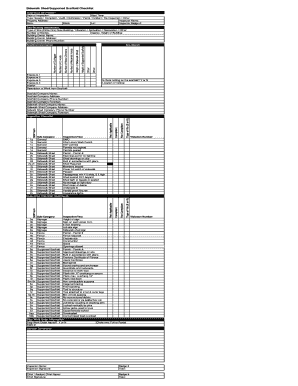
Get Sidewalk Shed/supported Scaffold Checklist. Form Doh-2557: Hipaa Compliant Authorization For
How it works
-

Open form follow the instructions
-

Easily sign the form with your finger
-

Send filled & signed form or save
How to fill out the Sidewalk Shed/Supported Scaffold Checklist, Form DOH-2557: HIPAA Compliant Authorization For online
This guide provides a clear and supportive overview of how to complete the Sidewalk Shed/Supported Scaffold Checklist, Form DOH-2557: HIPAA Compliant Authorization For. It breaks down each section of the form and offers step-by-step instructions tailored for all users, regardless of their legal experience.
Follow the steps to successfully complete your checklist.
- Use the ‘Get Form’ button to access the checklist and load it in your preferred online editor.
- Begin by filling out the inspection information section. Enter the date of inspection, start time, type of inspection (e.g., sweep, complaint, audit), and the property address. Provide your name as the inspector, badge number, and location details such as lot, block, and borough.
- In the exposure section, note down all relevant exposures (1 to 4) and any interior information. Describe the work being done from the scaffold clearly.
- Complete the site sketch section, providing a visual representation of the workspace as necessary.
- Specify the height of the sidewalk shed and provide details about material hoists and equipment used, such as the number of mast climbers and C-hooks.
- Fill out the scaffold information, including the height of the supported scaffold, type of site (e.g., new building, demolition), number of stories, overall height of the building, and the owner's contact information.
- Indicate whether there is netting on the scaffold with a simple 'Y' or 'N'. Provide the location of the netting if applicable.
- Input the scaffold company and sidewalk shed company's details, including names, addresses, phone numbers, and foreman’s names.
- Utilize the checklist format provided to evaluate compliance. For each item, indicate whether it is compliant or not compliant and specify any violations as required.
- After filling out the checklist, review your entries for accuracy. Once confirmed, save the changes, download the document, or print it for your records.
Complete your forms online to ensure you're complying with all necessary regulations.
Related links form
Laying favourites at odds under 2.0 is one of the safer bets you can make with your downside risk being limited. Here your liability will always be less than your potential profit.
Industry-leading security and compliance
US Legal Forms protects your data by complying with industry-specific security standards.
-
In businnes since 199725+ years providing professional legal documents.
-
Accredited businessGuarantees that a business meets BBB accreditation standards in the US and Canada.
-
Secured by BraintreeValidated Level 1 PCI DSS compliant payment gateway that accepts most major credit and debit card brands from across the globe.