Loading
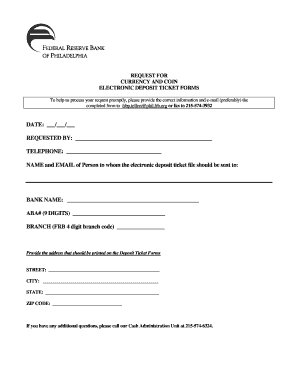
Get Request For Currency And Coin Electronic Deposit Ticket Forms. Request For Currency And Coin
How it works
-

Open form follow the instructions
-

Easily sign the form with your finger
-

Send filled & signed form or save
How to fill out the Request For Currency And Coin Electronic Deposit Ticket Forms online
This guide provides a clear and comprehensive overview for users on how to accurately fill out the Request For Currency And Coin Electronic Deposit Ticket Forms. Understanding each component of the form ensures a smooth submission process.
Follow the steps to complete your request efficiently.
- Click ‘Get Form’ button to obtain the form and open it in the editor.
- Enter the date in the provided format (MM/DD/YYYY) in the designated 'DATE' field to ensure accurate processing.
- Fill in the 'REQUESTED BY' section with your full name to identify who is making the request.
- Provide a contact telephone number in the 'TELEPHONE' field for any follow-up questions regarding your request.
- Complete the 'NAME and EMAIL of Person' section, specifying the individual who should receive the electronic deposit ticket file.
- In the 'BANK NAME' field, input the full name of the financial institution to which you are making the request.
- Fill in the 'ABA# (9 DIGITS)' with the appropriate American Bankers Association number to ensure the request is directed correctly.
- Input the 'BRANCH' code, using the four-digit Federal Reserve Bank branch code relevant to your transaction.
- Provide the address that should be printed on the Deposit Ticket Forms in the respective fields: 'STREET', 'CITY', 'STATE', and 'ZIP CODE'. Ensure accuracy for proper delivery.
- After completing all sections, review your entries for correctness. Save changes, download, print, or share the filled form via your preferred method.
Complete your Request For Currency And Coin forms online now for efficient processing.
Indicate amount of coin on the "coin" line on the deposit slip. Write this total in both total boxes on the deposit slip.
Industry-leading security and compliance
US Legal Forms protects your data by complying with industry-specific security standards.
-
In businnes since 199725+ years providing professional legal documents.
-
Accredited businessGuarantees that a business meets BBB accreditation standards in the US and Canada.
-
Secured by BraintreeValidated Level 1 PCI DSS compliant payment gateway that accepts most major credit and debit card brands from across the globe.