Loading
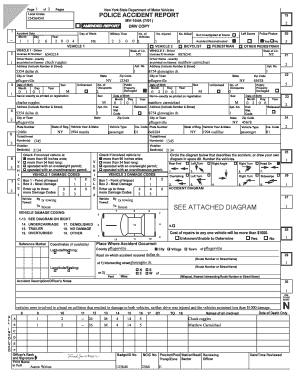
Get Sample Collision Report (pdf) - Reportbeam
How it works
-

Open form follow the instructions
-

Easily sign the form with your finger
-

Send filled & signed form or save
How to fill out the Sample Collision Report (PDF) - ReportBeam online
This guide provides a detailed overview of the Sample Collision Report (PDF) - ReportBeam, helping users understand how to complete the form accurately and effectively. Whether you're new to this process or just need a refresher, the following steps will assist you in navigating each section of the report.
Follow the steps to fill out the Sample Collision Report online.
- Click the ‘Get Form’ button to access the form and open it in your preferred editing tool.
- Begin by entering the accident date. Fill in the month, day, and year of the incident in the designated fields.
- Indicate the day of the week by selecting or inputting the corresponding option.
- Record the number of injured individuals and the number of vehicles involved in the collision in the respective fields.
- For Vehicle 1, input the driver’s license ID number, and the driver’s name as it appears on the license. Include the complete address, ensuring to note the city, state, and zip code.
- Fill in the driver’s date of birth and sex. Provide the state of license issuance.
- Next, for Vehicle 1, enter details about the vehicle, including the year, make, and plate number, followed by the type of vehicle.
- Repeat steps 5 to 7 for Vehicle 2, ensuring that you enter all information accurately for each driver and vehicle.
- Use the provided damage codes to indicate the extent of the damages for both vehicles involved in the accident.
- Complete the accident diagram section by marking a visual representation of the accident and numbering the vehicles accordingly.
- Provide details regarding the accident location, including county, city, and the specific road where the incident occurred.
- In the accident description section, summarize the details of the incident, including damage incurred, number of occupants, and any relevant notes from the police report.
- Lastly, once all sections are filled, review your entries carefully. Save the changes, and choose to download, print, or share the completed form as necessary.
Take the next step in your documentation process by filling out your Sample Collision Report online today.
You may be able to request a copy of a collision report online without having to complete this form or visit a branch office. http://.scdmvonline.com/Vehicle-Owners/Collision-Reports. The request fee is $6.00 per report. If completing this form, provide as much information as possible.
Industry-leading security and compliance
US Legal Forms protects your data by complying with industry-specific security standards.
-
In businnes since 199725+ years providing professional legal documents.
-
Accredited businessGuarantees that a business meets BBB accreditation standards in the US and Canada.
-
Secured by BraintreeValidated Level 1 PCI DSS compliant payment gateway that accepts most major credit and debit card brands from across the globe.