Loading
Get Registration Form 2 - Ontario Central Forms Repository - Forms Ssb Gov On
How it works
-

Open form follow the instructions
-

Easily sign the form with your finger
-

Send filled & signed form or save
How to use or fill out the Registration Form 2 - Ontario Central Forms Repository - Forms Ssb Gov On online
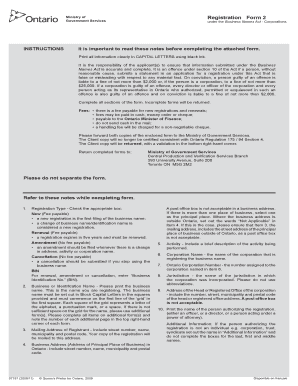
This guide provides clear, step-by-step instructions on completing the Registration Form 2 for the Ontario Central Forms Repository. Whether you are registering a new business name or renewing an existing one, following these instructions will help ensure that your form is filled out accurately and efficiently.
Follow the steps to fill out the registration form correctly.
- Press the ‘Get Form’ button to access the registration form and open it in the online editor.
- Choose the registration type by checking the appropriate box. Options include 'New', 'Renewal', 'Amendment', or 'Cancellation'. Note that if you select 'B', 'C', or 'D', you must enter your Business Identification Number.
- Print the business or identification name clearly in block capital letters in the designated squares. Make sure the name fits within the grid provided; if not, use additional pages and note their numbers.
- Fill in your mailing address. Include complete details such as street number, name, municipality, and postal code. This is where your copy of the registration will be sent.
- Provide the address of the principal place of business in Ontario. Ensure it is a complete address as a post office box is not acceptable.
- Include a brief description of the activity performed under the business name. This information should be concise yet descriptive.
- If applicable, write the corporation name that is registering the business name.
- Enter the Ontario Corporation Number assigned to your corporation.
- Specify the jurisdiction in which your corporation was incorporated, avoiding abbreviations.
- Provide the address of the head or registered office of the corporation. This must also include the complete street address, as post office boxes are not allowed.
- Print the name of the person authorizing the registration. If this individual is not a person, provide the name in the additional information section without completing the boxes for last, first, and middle names.
- Review all information for accuracy. Incomplete forms will be returned, and it is important to ensure all details are correct.
- Once completed, save your changes, and choose any necessary options like downloading, printing, or sharing the form.
Start filling out your Registration Form 2 online now for a smoother business registration process.
If this is a malfunction on a different phone than the one you intend to replace, call 888-881-2622. An expert will help you. If the device has accidental damage caused during use, has been lost or stolen, or it has been more than 12 months, you can still replace your device, but you'll need to start a claim.
Industry-leading security and compliance
US Legal Forms protects your data by complying with industry-specific security standards.
-
In businnes since 199725+ years providing professional legal documents.
-
Accredited businessGuarantees that a business meets BBB accreditation standards in the US and Canada.
-
Secured by BraintreeValidated Level 1 PCI DSS compliant payment gateway that accepts most major credit and debit card brands from across the globe.