Loading
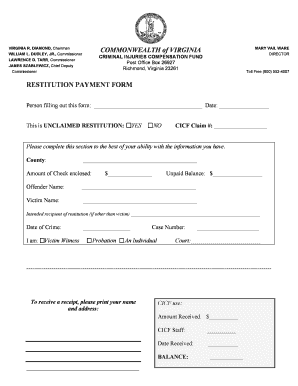
Get Restitution Payment
How it works
-

Open form follow the instructions
-

Easily sign the form with your finger
-

Send filled & signed form or save
How to fill out the Restitution Payment online
This guide provides clear instructions on how to complete the Restitution Payment form online. Follow the steps outlined below to ensure your submission is accurate and complete.
Follow the steps to fill out the Restitution Payment form online.
- Click ‘Get Form’ button to obtain the form and open it in your digital editor.
- In the first section, write the name of the person filling out the form and the date next to it. This information identifies who is submitting the form.
- Indicate whether the restitution is unclaimed by selecting 'YES' or 'NO'. This helps determine the status of the payment.
- Enter the CICF Claim Number in the designated field. This number is essential for tracking your claim.
- Fill out the county where the crime occurred, as this information is important for processing.
- State the amount of the check you are enclosing. This is vital for processing the restitution amount.
- Specify the unpaid balance. Accurate reporting helps in evaluating the remaining restitution owed.
- Provide the offender's name, which is necessary for linking the restitution to the correct individual.
- Input the victim's name in the appropriate field to clarify who the restitution is intended to benefit.
- If the intended recipient of the restitution is different from the victim, please write their name in the specified section.
- Record the date of the crime. This is significant for reference and validation purposes.
- Indicate your relationship to the case by choosing between 'Victim', 'Witness', 'Probation', or 'An Individual'. This establishes your role in the circumstances.
- Enter the case number associated with the crime, which is vital for tracking and referencing your submission.
- Fill in the court name processing this case to assist in directing your form appropriately.
- To receive a receipt, print your name and address in the designated area provided at the bottom of the form.
- Review all the entered information for correctness before proceeding. Once satisfied, you can save changes, download, print, or share the form as needed.
Complete your Restitution Payment form online today for efficient processing.
A. When the court orders an offender to pay restitution, it is ordering them to pay back the damage caused, both to the state and to the victim(s). The court orders restitution in all cases and does not consider the offender's ability (or inability) to pay when the order is made.