Loading
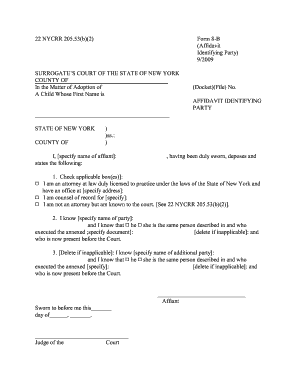
Get 22nycrr 20553b2 Form 8 C
How it works
-

Open form follow the instructions
-

Easily sign the form with your finger
-

Send filled & signed form or save
How to fill out the 22nycrr 20553b2 Form 8 C online
The 22nycrr 20553b2 Form 8 C is an important document used in legal proceedings. This guide will help users navigate the process of filling it out online, ensuring that each section is completed accurately and effectively.
Follow the steps to fill out the form online with ease.
- Click ‘Get Form’ button to obtain the form and open it in the editor.
- Begin by entering the county of the Surrogate’s Court at the top of the form.
- In the 'In the Matter of Adoption of' section, specify the child's first name.
- Provide the Docket or File number where indicated.
- In the Affiant section, write your name, identifying yourself as the person swearing to the affidavit.
- Check the applicable box regarding your status (attorney, counsel of record, or known to the court) and provide the necessary information.
- Specify the name of the party you are swearing to know and confirm their identity by checking the appropriate box for gender.
- If applicable, include any additional party's name and confirm their identity in the same manner as above.
- Review all the provided information for accuracy.
- Once all fields are correctly filled out, users can save changes, download the document, print it, or share it as required.
Complete your documentation online for a seamless legal process.
Decisions. If the motion or OSC can't be settled, the Judge will make a decision. Sometimes, the Judge makes a decision right away. If not, the Judge has 60 days by law to decide the motion.