Loading
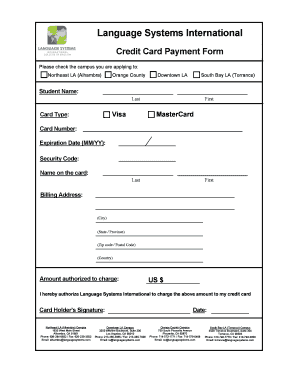
Get Credit Card Payment Form - Language Systems International
How it works
-

Open form follow the instructions
-

Easily sign the form with your finger
-

Send filled & signed form or save
How to fill out the Credit Card Payment Form - Language Systems International online
Filling out the Credit Card Payment Form for Language Systems International online is a straightforward process. This guide will walk you through each section of the form to ensure your payment is processed accurately and efficiently.
Follow the steps to complete your payment form.
- Click the ‘Get Form’ button to obtain the Credit Card Payment Form and access it in your editor.
- Select the campus you are applying to by checking the appropriate box. Options include Northeast LA (Alhambra), Orange County, Downtown LA, and South Bay LA (Torrance).
- Enter your student name in the designated fields. Provide your last name first, followed by your first name.
- Choose your card type from the available options: Visa or MasterCard.
- Input your card number in the section labeled 'Card Number.' Ensure all digits are entered correctly.
- Fill in the 'Expiration Date' using the format MM/YY for when your card expires.
- Provide the 'Security Code,' which is typically a three or four-digit number found on the back of your card.
- Enter the name on the card in the specified fields for both first and last names.
- Complete the billing address section with your address details. Include your city, state or province, zip code or postal code, and country.
- Specify the amount you authorize to charge in US dollars next to 'Amount authorized to charge.'
- Review the statement asserting your authorization for Language Systems International to charge the specified amount to your credit card. Confirm you understand and agree.
- Sign the form under 'Card Holder’s Signature' to provide your authorization.
- Finally, include the date of signing at the designated area.
- Make sure to save your changes, then download, print, or share the form as necessary.
Complete your Credit Card Payment Form online today for a seamless payment experience.
If a charge is not authorized, it usually means that there is a problem with the account or that you are at, near, or over your credit limit. Usually, when you use your credit card at a store the merchant obtains authorization from the card issuer.
Industry-leading security and compliance
US Legal Forms protects your data by complying with industry-specific security standards.
-
In businnes since 199725+ years providing professional legal documents.
-
Accredited businessGuarantees that a business meets BBB accreditation standards in the US and Canada.
-
Secured by BraintreeValidated Level 1 PCI DSS compliant payment gateway that accepts most major credit and debit card brands from across the globe.