Loading
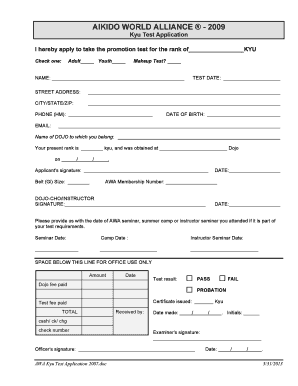
Get Test Application Firm Aikido World Alliance Form
How it works
-

Open form follow the instructions
-

Easily sign the form with your finger
-

Send filled & signed form or save
How to fill out the Test Application Firm Aikido World Alliance Form online
This guide provides a comprehensive overview of how to effectively fill out the Test Application Firm Aikido World Alliance Form online. Whether you are a new applicant or a returning member, this step-by-step approach will ensure that you complete your application accurately and efficiently.
Follow the steps to complete your application smoothly.
- Click ‘Get Form’ button to obtain the form and open it in the editor.
- In the first section, indicate the promotion test rank you are applying for by filling in the blank next to 'rank of'. Select whether you are an adult or youth by checking the appropriate box.
- If this is a makeup test, mark the checkbox to indicate so.
- Provide your full name in the designated field.
- Enter the test date in the provided line. Ensure that the format you use is consistent with the requirements.
- Fill in your street address, city, state, and ZIP code, making sure each part is accurate.
- Provide your home phone number and email address to facilitate communication.
- Input your date of birth in the specified format.
- Write the name of the dojo you belong to in the designated area.
- State your present rank and the dojo where your current rank was obtained, including the date it was awarded.
- Provide your signature in the designated signature field.
- Indicate your belt (gi) size in the corresponding field.
- Fill out the date when you are completing the application form.
- Input your AWA membership number in the provided line.
- The dojo-cho or instructor must sign in the designated area, followed by the date of their signature.
- If applicable, provide the dates for any AWA seminars, summer camps, or instructor seminars you have attended as part of your test requirements.
- Once you have filled in all required sections, save your changes. You can then download, print, or share the form as needed.
Complete your documents online today for a seamless application experience.
To create a UPI Payment Link: Log in to the. Razorpay Dashboard. ... Navigate to Payment Links. Click Create Payment Link. Click UPI Payment Link. Enter the required details in the UPI Payment Link pop-up page. ... Review the details and click Create Payment Link.
Industry-leading security and compliance
US Legal Forms protects your data by complying with industry-specific security standards.
-
In businnes since 199725+ years providing professional legal documents.
-
Accredited businessGuarantees that a business meets BBB accreditation standards in the US and Canada.
-
Secured by BraintreeValidated Level 1 PCI DSS compliant payment gateway that accepts most major credit and debit card brands from across the globe.