Loading
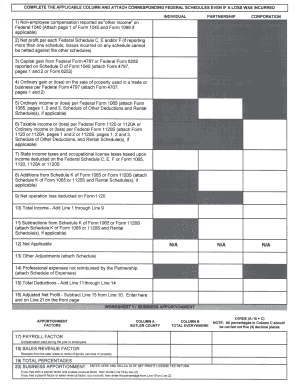
Get Net Profit Form Page Two - Butler County - Butlercounty Ky
How it works
-

Open form follow the instructions
-

Easily sign the form with your finger
-

Send filled & signed form or save
How to fill out the Net Profit Form Page Two - Butler County - Butlercounty Ky online
Filling out the Net Profit Form Page Two for Butler County is essential for accurately reporting your business income and related deductions. This guide will provide clear, step-by-step instructions to help you complete the form online with ease.
Follow the steps to effectively complete the Net Profit Form Page Two.
- Click ‘Get Form’ button to acquire the form and open it in the editor.
- Begin by selecting the applicable column for your business structure: Individual, Partnership, or Corporation. If none apply, choose N/A.
- Fill in Line 1 with non-employee compensation reported as other income on Federal 1040. Attach page 1 of Form 1040 and Form 1099 if applicable.
- Complete Line 2 by reporting the net profit from each Federal Schedule C, E, and/or F. If using multiple schedules, remember that losses cannot be offset against gains from others.
- For Line 3, report any capital gain from Federal Form 4797 or Federal Form 6252 that appears in Schedule D of Form 1040. Be sure to attach Form 4797, pages 1 and 2, or Form 6252.
- Input any ordinary gain or loss on the sale of property used in business on Line 4, referencing Federal Form 4797. Attach Form 4707, pages 1 and 2.
- Enter ordinary income or loss from Federal Form 1065 on Line 5. Attach Form 1065, pages 1, 2, and 3, along with any applicable schedules.
- Fill in Line 6 with taxable income or loss from Federal Forms 1120, 1120A, or 1120S. Attach the appropriate forms as specified.
- Report state income taxes and occupational license taxes based on income on Line 7, derived from Federal Schedule C, E, F, or relevant corporate forms.
- Include any additions from Schedule K of Form 1065 or Form 1120S on Line 8. Attach Schedule K and rental schedules as necessary.
- List any net operating loss deducted on Form 1120 on Line 9.
- Calculate total income by adding Lines 1 through 9 and enter the result on Line 10.
- For Line 11, subtract adjustments from Schedule K, attaching relevant schedules.
- Complete Lines 12 and 13, if applicable, and attach any required schedules.
- Input professional expenses not reimbursed by the Partnership on Line 14, attaching the schedule of expenses.
- Calculate total deductions on Line 15 by adding Lines 11 through 14.
- Determine adjusted net profit by subtracting Line 15 from Line 10, then enter this amount on Line 16 and on Line 21 of the front page.
- Proceed to the worksheet for business apportionment, filling in payroll and sales revenue factors in Columns A and B as applicable.
- Calculate percentages and complete the total on Line 19, using the indicated formulas to derive amounts.
- Finally, ensure all sections are complete, then save your changes, download, print, or share the PDF as needed.
Start filling out your documents online today to ensure compliance and accuracy.
For tax periods prior to January 1, 2023, the tax is 1.49% of the gross compensation paid. Beginning January 1, 2023, the tax is 1.65% of the gross compensation paid. Forms and instructions are available at the Occupational Tax Office or may be downloaded below.
Industry-leading security and compliance
US Legal Forms protects your data by complying with industry-specific security standards.
-
In businnes since 199725+ years providing professional legal documents.
-
Accredited businessGuarantees that a business meets BBB accreditation standards in the US and Canada.
-
Secured by BraintreeValidated Level 1 PCI DSS compliant payment gateway that accepts most major credit and debit card brands from across the globe.