Loading
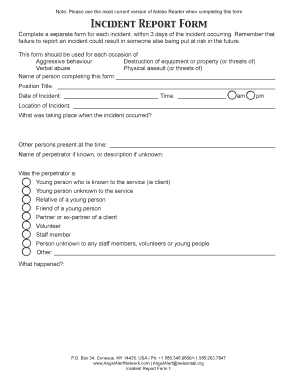
Get Incident Report Form - Angel Alert Network
How it works
-

Open form follow the instructions
-

Easily sign the form with your finger
-

Send filled & signed form or save
How to fill out the Incident Report Form - Angel Alert Network online
Completing the Incident Report Form is a crucial step in documenting incidents to ensure safety and accountability. This guide provides clear, step-by-step instructions for successfully filling out the form online, ensuring you gather all necessary information to address the incident effectively.
Follow the steps to accurately complete the Incident Report Form online.
- Click ‘Get Form’ button to access the Incident Report Form and open it for online completion.
- Begin by entering your name in the designated field for the person completing the form.
- Enter your position title in the appropriate field.
- Record the date of the incident in the specified area.
- Indicate the time of the incident by selecting either am or pm.
- Fill in the location where the incident took place in the provided text box.
- Describe the situation that was occurring at the time of the incident.
- List the names of other people present during the incident.
- If known, provide the name of the perpetrator, or a description if unknown.
- Specify the relationship or role of the perpetrator related to the service.
- Detail what happened during the incident in the provided space.
- Identify who the aggression was aimed at.
- Indicate whether any injuries were sustained, and if so, provide the name of the injured person and details of injuries.
- Report if any property or equipment was damaged, including specifics of the damage.
- State the cause of the incident as you perceive it.
- Reflect on any warning signs that were evident before the incident.
- Note any actions taken by staff or volunteers prior to the incident.
- Describe actions executed during or after the incident.
- Confirm whether the incident has been reported to the appropriate supervisor.
- Indicate if staff and volunteers were given an opportunity to debrief the situation.
- Outline any required follow-up actions.
- Sign the form and date it before submitting.
- After completion, save your form by going to File >> Save As. You may then choose to print a hard copy or email the completed form to the designated department.
Start filling out your Incident Report Form online today to ensure timely documentation of incidents.
The MSP Angel Program allows individuals struggling with a Substance Use Disorder to walk into a MSP post during regular business hours to ask for assistance.