Loading
Get Mfippa Request Form - Wellesley
How it works
-

Open form follow the instructions
-

Easily sign the form with your finger
-

Send filled & signed form or save
How to fill out the MFIPPA Request Form - Wellesley online
The MFIPPA Request Form - Wellesley is designed to facilitate access to information under the Freedom of Information and Protection of Privacy Act. This guide provides step-by-step instructions on how to successfully complete the form online, ensuring that your request is submitted accurately.
Follow the steps to complete the MFIPPA Request Form - Wellesley online.
- Press the ‘Get Form’ button to retrieve the MFIPPA Request Form and open it for review.
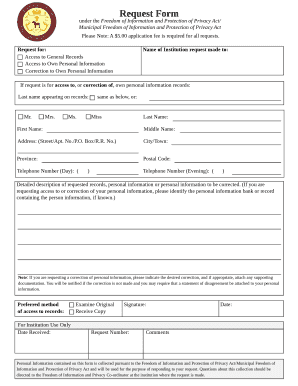
- Indicate the type of request you are making by selecting one option: 'Access to general records', 'Access to own personal information', or 'Correction to own personal information'.
- Complete the name of the institution to which the request is directed.
- If your request involves access to or correction of your personal information, provide your last name as it appears in the records, and fill in your first name and middle name as applicable.
- Provide your address, including street/apt number, city/town, province, and postal code.
- Fill in your daytime and evening telephone numbers to ensure you can be reached for any follow-up.
- Write a detailed description of the records or personal information you are requesting or need corrected. If applicable, identify the personal information bank or record.
- If you are requesting a correction, clearly indicate the desired correction and attach any supporting documentation if necessary.
- Select your preferred method of access to records—indicate whether you wish to examine the original documents or receive a copy.
- Once all required fields are completed, review your form for accuracy. You can then save the changes, download the form, print it, or share it as required.
Begin your document submission process online today by filling out the MFIPPA Request Form.
How do I apply? To apply to Wellesley as a transfer or Davis Degree applicant, you must complete and submit the online Common Application for Transfer Candidates. It's free to do so.