Loading
Get Stlcc 1098t
How it works
-

Open form follow the instructions
-

Easily sign the form with your finger
-

Send filled & signed form or save
How to fill out the Stlcc 1098t online
Filling out the Stlcc 1098t online is an essential task for students seeking to obtain their tax form. This guide will walk you through each step of the process, ensuring you can complete it with ease and confidence.
Follow the steps to access and complete your Stlcc 1098t online.
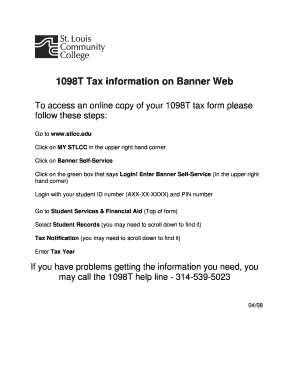
- Click ‘Get Form’ button to obtain the form and open it in the editor.
- Navigate to www.stlcc.edu in your web browser.
- Select MY STLCC located in the upper right corner of the webpage.
- Proceed to click on Banner Self-Service to access your student account.
- Once on the Banner Self-Service page, click the green ‘Login!’ box in the upper right corner.
- Log in using your student ID number (formatted as AXX-XX-XXXX) and your PIN number.
- Once logged in, locate Student Services & Financial Aid at the top of the form.
- Select Student Records from the options available; you may need to scroll down to find it.
- Find and click on Tax Notification, which might also require scrolling down.
- Fill in the Tax Year field with the appropriate year relevant to your tax form.
- After entering all required information, you will have the option to save changes, download, print, or share your completed form.
Start filling out your Stlcc 1098t online today to ensure you meet your tax requirements.
If the student should have, but did not receive the Form 1098-T, contact the school for a copy.